|
Okay, time for a CNC mill for my PCB work. Rather than go large and expensive I thought I’d start on something small and relatively low cost to sort out the process. I settled on a CNC 1208+ kitset CNC mill as it appears to be robustly constructed with lead screws as opposed to belts. It is laser-ready so I also ordered a 500 mW 404 nm (blue) laser module from the same supplier. Note that this mill is also listed as a Benbox Model 1310 CNC machine.
This page has grown rather long, but it includes some important stuff in bold type. If you read nothing else then scan for the bold type comments which may save you some grief.
Rather than let you read to the end of this post, if you’re planning on milling hard aluminium alloys or steel with this toy mill then don’t buy one. It is quite capable for PCB drilling, laser burning, and milling of relatively soft materials like wood and plastic. It is also a great introduction to CNC machining and an interesting assembly challenge. While it can mill aluminium alloys this will be slow and inaccurate due to the lack of spindle motor power and backlash in the lead screws.
Another down-side of this mill is the limited work space of just 126 mm X x 88 mm Y x 38 mm Z. While this would have been adequate for almost all of the boards I have had cause to design and make over the last 40 years, the Z axis drive and spindle motor chuck to bed clearance of just 55 mm is a significant limitation for 3D milling. If we allow say 1 mm travel clearance above the stock and 2 mm for a sacrificial bed then the maximum possible depth of cut is just 26 mm!
The kitset CNC mill arrived with parts packaged in foam in a cardboard carton. A few of the parts had come loose in transit and there were a few scratch marks on some of the precision ground rods. There is an Auduino Nano based controller board with three Pololu clone stepper motor controller bridges, a bunch of cables, and a 24 V power supply with the wrong mains plug for this part of the world.
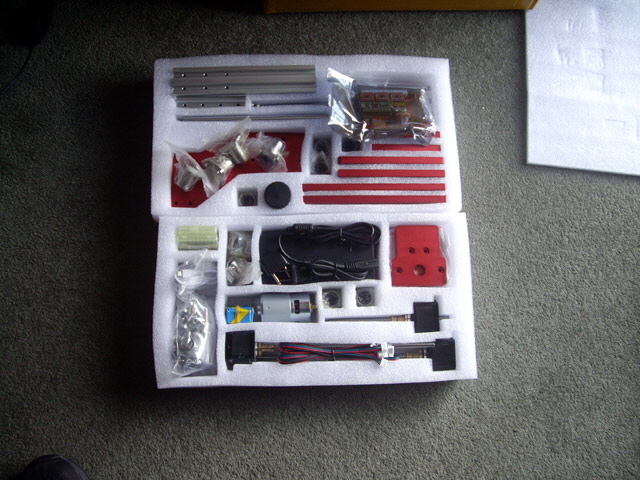
Figure 1. CNC Mill Kitset
There was no manual, software, assembly instructions, wiring instructions or packing list in the box? I had ordered a CNC mill but as an added bonus they have sent me a jigsaw puzzle. I tried contacting the seller but despite numerous emails they simply didn’t reply (just as they had been less than responsive when I tried to add the laser to the mill kit order).
Eventually I found that the supplier had sent me a link for the laser purchase which contained a zip file with a short assembly video for the mill hardware (no electronics), two Windows software packages and a USB driver for the Nano controller.
The mill hardware took a few hours to assemble. I made a few mistakes with part orientation along the way but these were easily corrected with nothing broken. The lead-screw nut design has changed, and the spindle motor has a steel cowling that needs to be removed otherwise it won’t fit in the Z stage mount. There was also some swarf on one of the aluminium plates that ended up stuck in my thumb but otherwise assembly was relatively straight forward. The kit did include a set of small Allen keys, a collection of tools for the mill. At the end of the assembly process there were a few extra bits, some clearly spare, and others for work table clamps and I figure mounting the controller board. Here are a bunch of photos to help with your assembly.
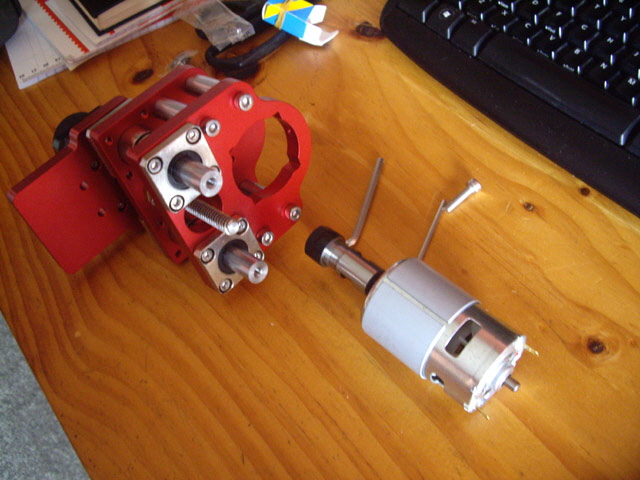
Figure 2. Z Stage Assembled
(Note that the grey steel cowling on the motor needs to be removed or it won’t fit in the stage.)
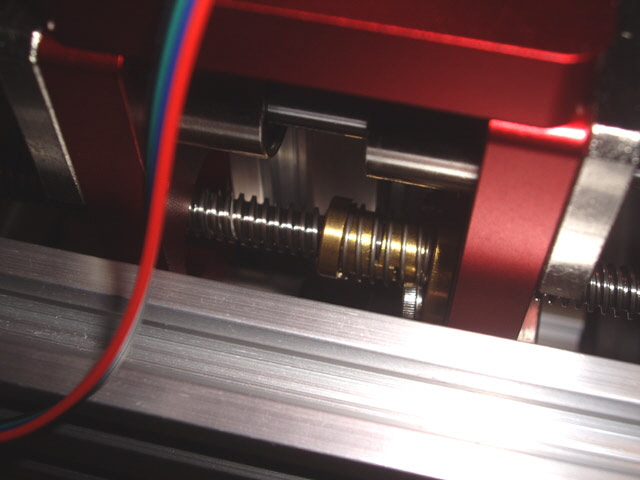
Figure 3. Lead Screw Nut Design Change
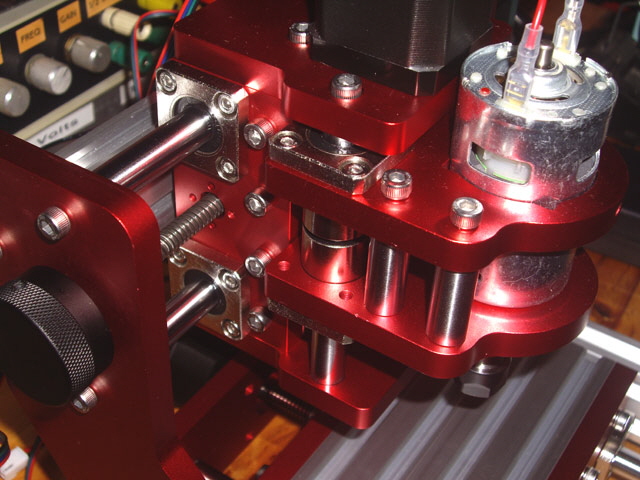
Figure 4. Close Up of X and Z Axis
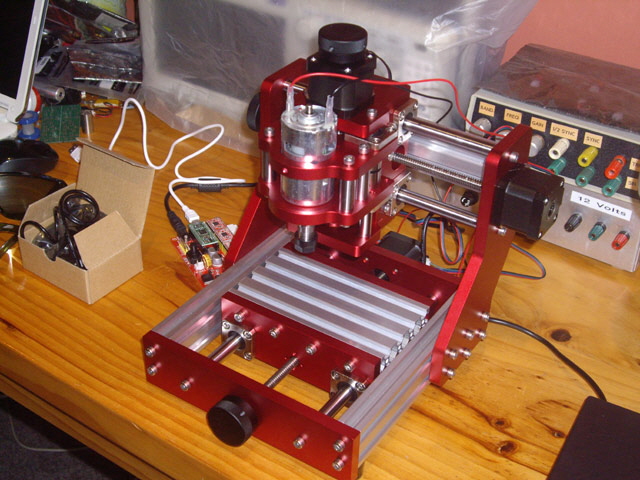
Figure 5. CNC Mill Hardware Assembled, Adjusted and Tightened
After the mill is assembled loosen off the linear bearing machine screws and they should self-centre with the support rods. Then go around and tighten all of the machine screws, all of which are accessible.
The lead screws have a 2 mm pitch. The stepper motors are two phase and I can feel 48 poles per revolution from the manual controls. I figure we have some form of micro-stepping. Under the motor controller boards there are three jumpers labelled MS1, MS2 and MS3. Only two jumper links are fitted (MS1 and MS2) and note that there are no spares. The controller appears to be set for 1/8th micro-stepping and if this is correct then the step resolution is about 2 mm / (48 x 8 microsteps per rev) ~ 0.005 mm.
The finished machine is nice and robust. There is perceivable backlash on the lead screws but I put this down to the strength of the compression springs on the lead screw nuts. I might change these out if this proves to be a problem.
The spindle motor mount could be improved to make it more secure and allow rapid aligned change-out for the laser module. The motor is held in place by just two machine screws on its face. There is an additional threaded hole at the front of the X axis top plate which appears to be for motor/laser mounting, but using this is likely to force the motor/laser off the vertical axis unless the tool head is packed.
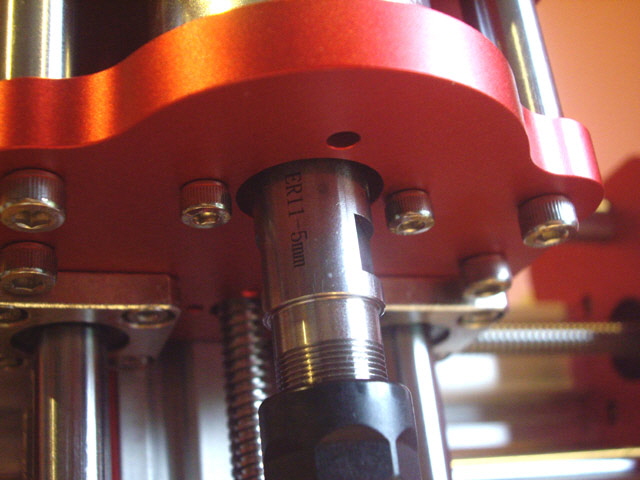
Figure 6. Spindle Motor Mount
(Maybe not as secure as it could be.)
Now for the electronics. The controller board has BENBOX.CN 180615 based on the silk screen mask. That’s all the information that you get! With a Google search I found some images of similar boards which gave me enough of a steer to figure out the wiring and function. The processor shield is an Arduino Nano and the three stepper motor shields are Pololu clones based on the A4988 stepper motor driver chip.

Figure 7. Controller Board With Connection Labels
Note: If you look at the spindle motor plug at the top right you will see that the red wire is incorrectly polarised to the -ve supply pin on the board. This is a manufacturing defect that caused me significant grief until I eventually realized the spindle motor was turning backwards.
Warning. Double check that the spindle motor plug has been assembled by the manufacturer with the correct polarity. Somewhat further down the track I found that mine had been incorrectly assembled (as shown in the photograph above) and as a consequence the motor spins in the wrong direction for regular right handed drills and mills.
With the power supply connected to the controller board, and the controller board turned on I installed the Nano USB driver and ran the grblControl software package on a Windows 7 64 bit laptop. The software package has jog controls that should allow me to progressively connect and test the stepper motors and the spindle motor. With the USB port connected the controller board was up and running. Note that the driver does not seem to auto-detect consistently and it may need to be re-loaded from time to time.
My only mistake with the wiring was initially using the Y2 port which needed to be changed to Y1 (no damage done). The wiring plugs are all polarized which aids in correct assembly.
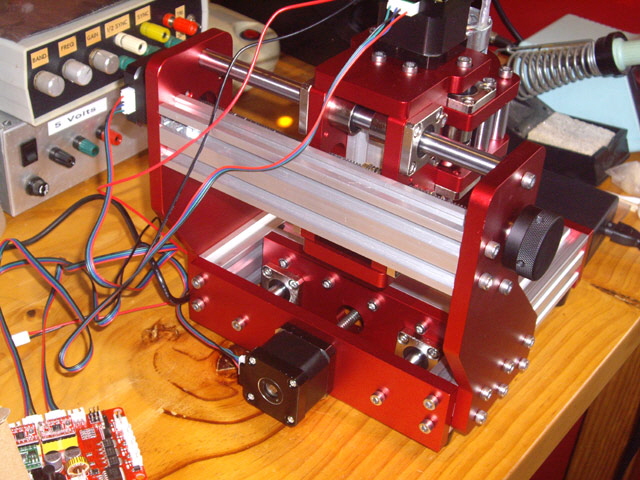
Figure 8. Wiring Complete
(Not yet secured.)
At the end of this process everything is driving correctly, but note that there are no end stops or home micro switches on the machine (and none are supplied). There appears to be a limit switch connectors (XL,YL, ZL) on the controller board. I may investigate this in due course. The wiring which is currently hanging free off the back of the machine and needs to be tidied up and secured with adequate flexibility for the X stage. I’ll get on to this once I’ve sorted out how to mount the controller board.
With the machine working I spent a moment lubricating the linear bearing rods with light machine oil and the lead screws with a couple of dots of lithium grease, if for no other reason that to prevent bloom rust from handling during assembly. This will need to be repeated from time to time. Without other guidance I suggest cleaning and light re-lubrication at least every ten hours of use or after a long stand period.
Using the grblControl console I was able to exercise the machine. The Y axis has a slight issue when moving –Y with a rattling aluminium noise. Everything is tight and the linear bearings are aligned and secure so I figure that this has something to do with the lead screw nut spring compression force. I turned the table 180 degrees so the lead screw nut was at the front of the table (and as far as possible from the stepper motor). The problem has now reversed with the rattle on +Y movement. I’ll investigate this further in due course.
Now to test the 405 nm 500 mW laser module. When something is covered in this many warning labels you might do well to expect that this device is potentially a hazard. Read these before you apply power and ensure that the beam path is controlled and free from reflective surfaces. You don’t want to look down the beam or at a reflection under any circumstances. Nor do you want to direct the focused beam onto your skin because it will burn.
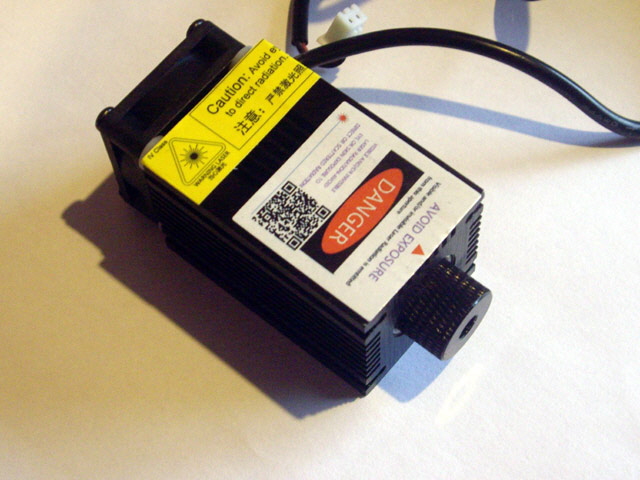
Figure 9. 405 nm 0.5 Watt Laser Module
Rather than mount the laser module on the machine I placed it on the bench pointing a safe direction, put on the safety glasses that came with the laser and made the connection to controller board. The module is working just fine including power control and the cooling fan starts up automatically when the module starts to get warm.
With the power set high (grblControl console) I held a notebook near the focal point and burnt a couple of wiggly lines through the facing page (actually charring through five pages all at once). The cut line is about
0.05 mm wide but increases with decreased paper traverse speed and my ability to keep the paper at the focal point. Provided I wind back the power and increase the laser speed I should be able to get an 0.2 mm spot size and expose as opposed to burn the PCB dry film resist and solder mask.
![]() 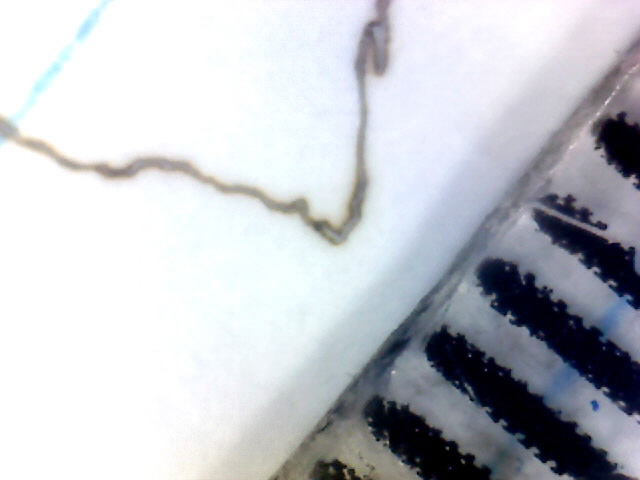
Figure 10. Burn Track Through Paper
(Black marks at lower right are 1 mm graduations.)
Note: professional board houses use photographic negatives and an exceptionally bright UV light source for photo resist exposure. The process is very fast and the negatives are solid black leading to excellent resolution (think computer mother board manufacture here). My current process uses laser printed negatives on Mylar film and a pretty conventional UV light box, both of which are far from ideal. I’m hoping that with adequate tuning the direct laser exposure will be a significant improvement over my current process, but in any case I can still revert to the negative and light box exposure, albeit with the additional requirement for film alignment.
I still haven’t mounted the controller board on the back of the mill chassis. I don’t want it exposed to milling and drilling swarf, laser fumes and maybe cutting oil so I’ll need to design one to fit and print it on my M2 3D printer. The case needs to facilitate cooling air flow as I fully expect some of the components to get quite warm during operation, particularly the stepper motor shields and the power regulators. I also need ready access for connecting the laser and spindle motor headers, and for operating the on/off push button switch.
I’ve swapped out the OEM A4988 stepper motor shields for Trinamic TMC2208 shields. You can read about this upgrade here.
While messing with the Controller Board during my shield update I noted that the existing 12 V output is actually 12.5 V. I have changed the divider resistors from 18 K and 2 K to 22 K and 2.5 K to reduce the output down to 12.25 V to better suit the laser module power supply requirement. I should also increase the output filter capacitor from the regulator to at least 330 uF in accordance with the data sheet.
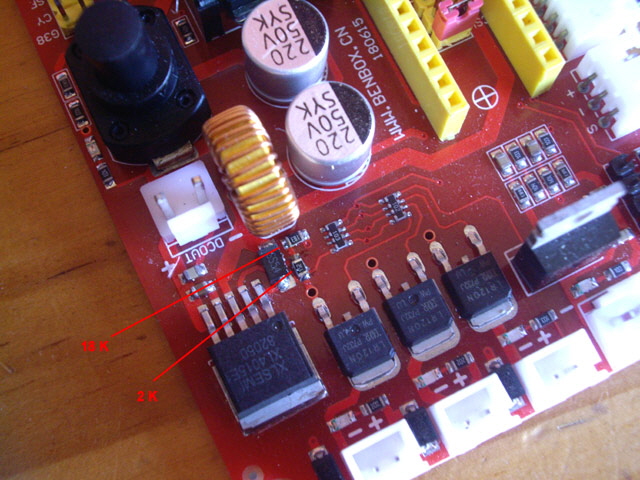
Figure 11. Voltage Divider for XL4015 Switching Regulator
(Note 220 uF output capacitor)
Back to the laser experiments...
To focus the laser, set the Z axis to mid height with a black anodized aluminium target on the mill bed. Put on some safety glasses as they will reduce the glare and allow you to see the focal spot. Turn the laser power setting way down, hold the laser at the mounting height, turn the laser on, and adjust the lens for an optimal spot. Now mount the laser in the mill head and use the Z axis to tune the focal spot.
There are another couple of design flaws apparent with the laser mount. You can’t adjust the laser lens focus with the laser module mounted in the mill head, and the mounting requires the use of a spacer to prevent the hex screw from graunching the laser case. The laser mounting is not as positively locating as I wound have liked, but it is secure.
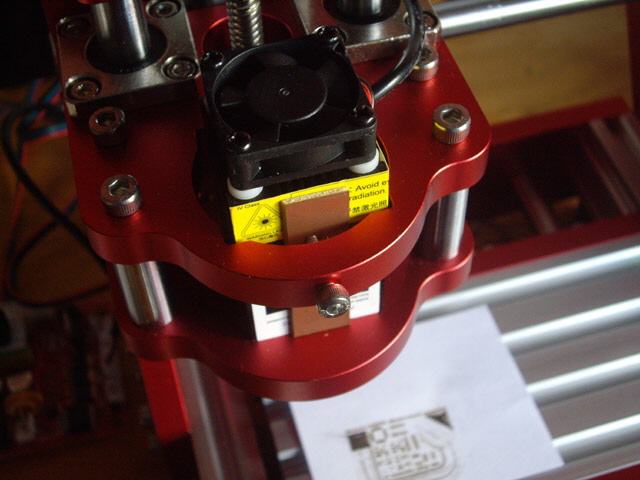
Figure 12. Laser Mounted in Mill Head
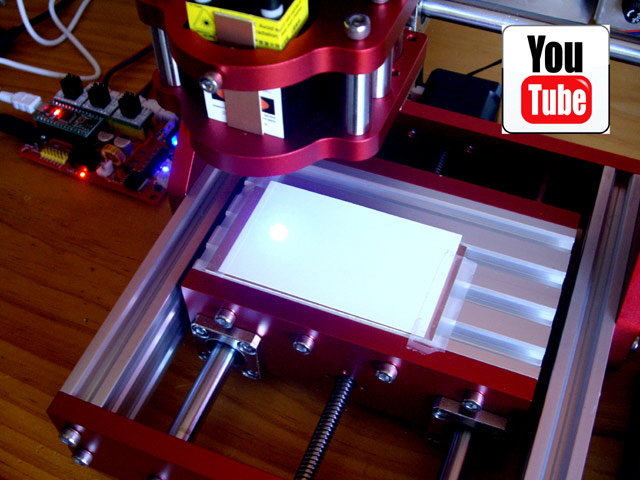
Figure 13. Laser Exposure of Test Pattern
(Click on image to view video.)
With the laser mounted, focused, and the power set relatively low (S 50 G Code) I placed a piece of 80 g / sq m white paper on the CNC mill bed and ran my test board G Code using grblControl with a feed rate of 1,000 mm/min. The paper burned clean through on the exposed lines so clearly the power level is too high for film exposure. At S 30 the extent of burn through was limited, with most of the exposure lines charred. The extent of char is not consistent and I attribute this to variations in the paper thickness and surface texture, and the time taken for the traverse acceleration and deceleration. The exposure will be significantly greater at acute changes in direction, such as 90 degree corners, and at the beginning and end of lines.

Figure 14. Laser Power Too High
(S 50 at 1000 mm/min, Lower right track is 0.005” wide.)
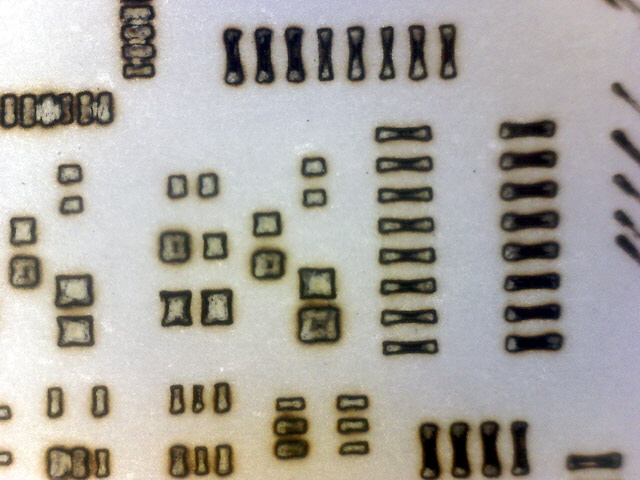
Figure 15. Laser Power Still Too High
(S 30 at 1,000 mm/min. Typical SMD packages including 0402 and SOT23-5 & 6
inadvertently exposed at 50% full size.)

Figure 16. Power Still Too High
(Note that individual laser lines are now visible with a width of ~0.16 mm)
The laser module is rated at 0.5 W at 405 nm (blue/violet). On the basis of this experiment I suspect that it will burn the film as opposed to expose it. Let’s do some calculations to understand what we’ve got and what we actually need.
Many dry films have a typical exposure of 100 mJ / sq cm at about 350 nm (ultra violet). Sensitive films will be less than 50 mJ / sq cm. Our 405 nm laser is not ultra violet but the film sensitivity spectrum is sufficiently broad that it should still expose the film. Let’s up the exposure energy to 200 mJ to compensate.
Our laser spot is about 0.16 mm in diameter based on the measured burn width. So the spot area is ~200E-6 sq cm. The maximum laser traverse speed is set to 1,000 mm/min (~16.7 mm/s).
Note that I made a mistake with the micro-step jumpers on the Trinamic sheilds and the traverse was actually 500 mm/min in my exposure experiments with everything effectively double exposed!
So the exposure time is 0.16 mm / 16.7 mm/s = ~ 10 ms. The exposure energy is 0.5 W x 10 ms = 5 mJ.
Now dividing by our focal spot area:
This is telling me that the 500 mW laser is over-powered by 25 J / 200 mJ or about a factor of 125 with a traverse rate of 1000 mm/min. No wonder my exposed areas are burning.
A problem that I have is that the laser output power is adjusted by drive voltage, not current (a diode laser has an IV characteristic curve generally similar to a silicon diode). So large changes in voltage will have little effect on output power. Some laser modules may also incorporate a constant current source driver too.
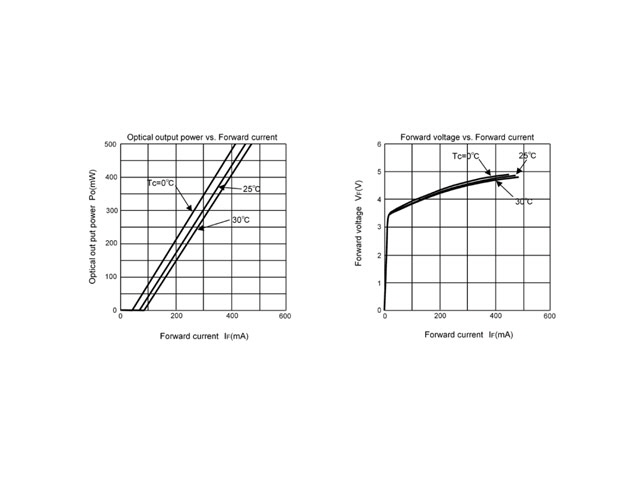
Figure 17. Typical Output Power, Voltage and Current Curves for 500 mW Laser
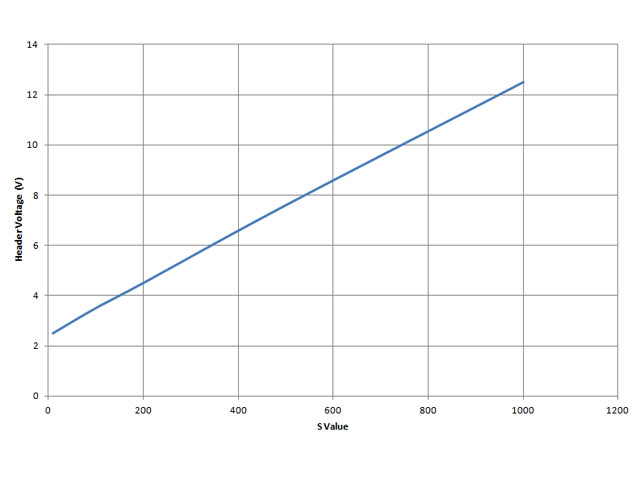
Figure 18. Laser Drive Voltage with G Code S Value
After further experiments I can reduce the laser output power with a G Code spindle speed value of between S10 and (minimum lasing threshold) and S20 to prevent charring 0.01 mm thick white paper at a traverse rate of 1000 mm/min. A value of S100 burns through an 0.3 mm thick business card at the same traverse rate.
With the reduction in S value the laser cooling fan is not turning on. I’m not sure if this is a problem because the laser module does not appear to be getting unduly warm. This is a direct consequence of the reduced drive voltage to tye laser module and the fan.
If I need more sensitivity than this then I will need some form of filter, an orifice plate, or a series resistor in the laser supply leads, or a lower powered laser to reduce the beam intensity. Click on the link to progress to my dry film exposure experiments.
While I’ve experimented with through hole drilling, and the CNC mill appears to be doing everything it should be I haven’t actually drilled anything yet. Best I get on with this so I can experiment with through-hole plating.
CNC Drilling
I drilled my first few hundred holes today with the CNC mill. There were a few issues.
The first, and most important, was that the drill jobs would stop at random during the job. This isn’t very good. The auduino controller board is hanging up. First up I checked my computer to make sure it wasn’t doing something strange that was corrupting the driver - nothing unusual here. Then I checked that the CNC mill wiring and the controller board shield was secure - all good here too. The problem only occurs when the spindle motor is running, but there were no issues with a 500 mW laser drawing about half an amp from the controller board. I figure that the DC spindle motor is creating noise on the power supply rails. It has no suppression snubbers on the terminals or in the case. I added three 0.1 uF 50V monolithic ceramic capacitors rated at 50V (I would have liked to use an increased voltage rating, say 600 V but this was what I had on hand); one between the motor terminals and one from each terminal to the motor case. The fix was immediate. No more stalled jobs!
Fit 0.1uF 100 V suppression capacitors across the spindle motor to prevent EMI to the controller board.
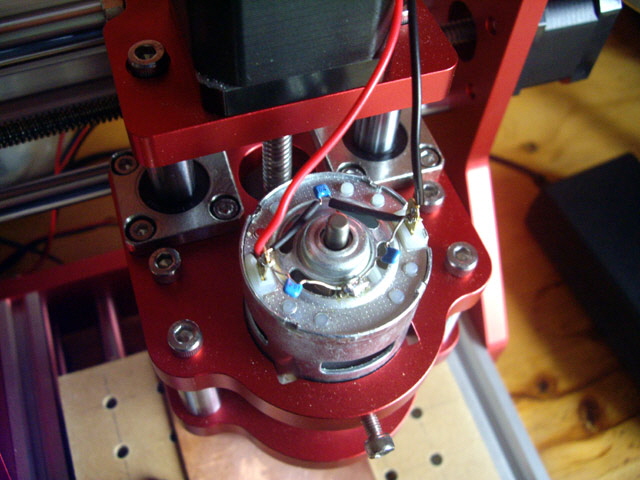
Figure 19. Filter Capacitors Added to Spindle Motor
On my very first run with an 0.6 mm diameter drill bit I failed to adequately tighten the chuck adequately. The drill progressively slipped upward and the holes became progressively shallower. I set about over-drilling with the bit re-set and tight in the chuck. Oops the drill broke early in the job. Too much feed. For sub-millimeter diameter drills the feed rate should be just two or three inches per minute at the relatively low 10,000 rpm maximum spindle speed. I changed the appropriate feed parameter in the .nc control file from F1000 to F3, cleared out the broken drill tip and tried over-drilling with a new 0.6 mm bit. The new bit broke again at the same hole as the previous break. My dumb! I thought I’d cleared the broken tip but part had lodged in the sacrificial bed (a piece of 6 mm thick MDF). This was my last 0.6 mm diameter drill bit.
With the bed properly cleared and with an 0.7 mm bit the job was re-run as a further over-drill and completed perfectly, but with one not so round hole where the two bits had broken.
The next attempt was on a new piece of board with an 0.5 mm diameter bit. The feed was reduced to F2. The job took 7 minutes and 19 seconds to drill 42 holes in a relatively small area (low traverse time). The holes were pretty much perfect at a rate of just over 10 seconds per hole. I could easily halve this rate by reducing the clearance between the drill tip and the work which was set at 4.191 mm (0.165”) when 2 mm would have been adequate. The swarf was was quite grainy and sat on top of the board. This is good because it implies that the drill is actually removing small chips as opposed to grinding each hole into dust. It also keeps the dust level manageable.
Figure 20. YouTube Movie Link
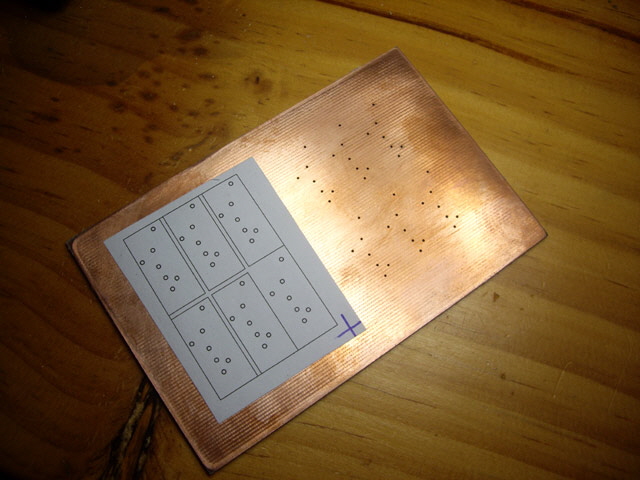
Figure 21. Hole Array Compared with Template
Time to check the hole positional accuracy. First I calculated the specified diagonal distances between remote holes as 42.79 and 44.16 mm across the panel. The measured distance between diagonal centres was 42.90 and 44.10 mm with the 0.5 mm diameter holes and 42.77 and 44.29 mm with the 0.7 mm holes. The actual measurements are a bit tricky but I figure that the holes are within 0.2 mm of specified centres. This is good enough for 0.5 mm vias provided that the artwork is dimensionally accurate. I can probably improve the drilling accuracy with a combination of a new drill bit and optimised feed and cutting speeds.
Finally I drilled a second board and used this to check the repeatability. The holes overlay exactly! Excellent.
Time to try some 3D milling...
A few folk have contacted me asking about 3D milling with the CNC 1208+ mill. The task I have at hand is really 2.5D milling because the finished surface are all parallel with one of the Cartesian axes, but the milling process is essentially the same as for 3D.
The first thing you’ll need for 3D milling is some software to make your models and convert these to compatible G Code. I use AutoDesk Inventor for modeling and have purchased MeshCAM for converting the STL or DWG files to G Code. There is a whole raft of other software that you can use such as Fusion 360 and free-ware such as PyeCam. I suggest that you take a moment to read through the many reviews and do try demos before you settle on a software solution.
When setting out your model you need to start thinking about optimum layout for milling efficiency and material use, and handedness. With this model the two parts are designed and laid out in Inventor so that the upper surfaces face each other when assembled. The material specifications have been optimized for 2” wide by 1/4” thick rectangular bar, with at least 2.5 mm between the parts and the edges of the stock.
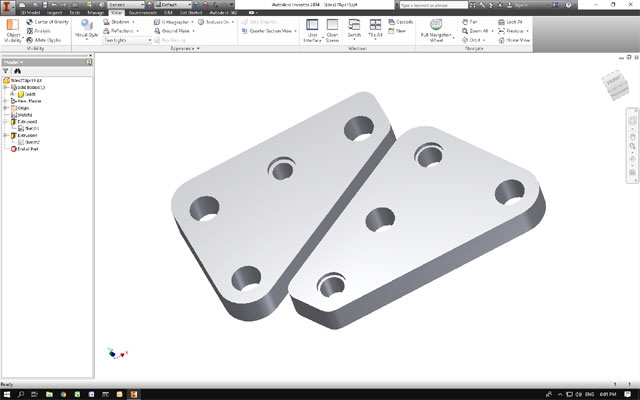
Figure 22. AutoDesk Inventor Model

Figure 23. MeshCAM Tool Path
(Note that this is an earlier model revision than the Figure above.)
Make sure to carefully examine your tool path to make sure that the tool is actually cutting the desired profile and not the machine bed or any clamps. Running the model without stock or a tool will let you examine the feed rates and tool path without ruining anything.
I’ve used the basic metric G Code profile in MeshCAM but this doesn’t generate code to start the spindle motor to the appropriate speed, or stop it at the end of the job. MeshCAM has a scripting function and prifle editing capability but for starters I have manually inserted M3 Sxxxx (where xxxxx is the spindle speed in RPM with a maximum value of 10000) after the first tool lift to traverse height, and M3 S0 after the last non-comment line in the .nc file.
Before I even attempt 3D milling I need to get the Benbox Controller board off the bench where it will get covered in swarf, dust and cutting oil. I mounted it on a simple Perspex plate on the CNC mill frame using 3D printed standoffs for the board. I haven’t made a cover plate for now because of all the leads, the need for good air flow (the motor shields get quite warm), and to allow ready access to the power switch and status LEDs.
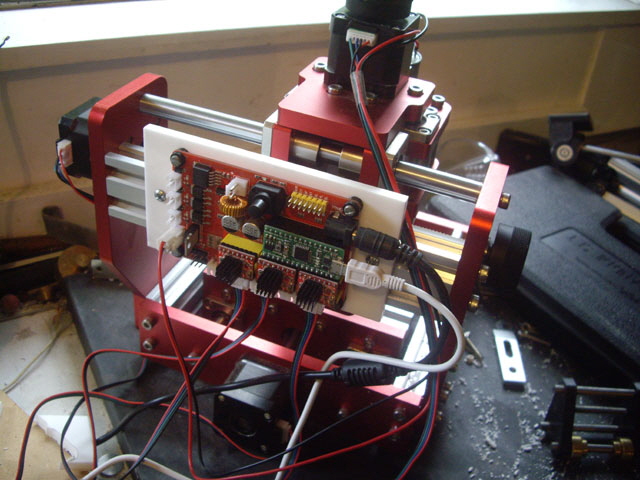
Figure 24. Controller Board Mount
You’ll also need some 1/8” shank milling cutters to suit the spindle motor. The Mill comes with a couple of milling cutters but you’ll need more. I suggest about ten each of 1/8” ball end mill, 1/8” plain end mill, and some spotting drills.
The most important parameters in making you mill work effectively are spindle speed settings, feeds and speeds. This mill is quite capable of cutting wood, plastics and aluminium effectively, but it lacks a robust spindle motor and high torque axial feeds. With small tool diameters we need high spindle speeds to get surface cutting speeds appropriate for the stock material. But we also want to ensure that we are actually cutting as opposed to grinding (which will burn the cutting flutes off the tools very quickly), and we can’t have excessive X or Y feeds or Z plunge because this will simply break the tool. Failure to make chips or shavings means we are grinding which will burn the cutting tool. Small chips or shavings carry away heat and lead to a clean cut, but if these are too large then the tool may break, or the spindle motor and/or axial drives will skip or stall.
A good starting point is up to the literature-recommended values for each material for cutting speeds, feeds, depth of cut, overlap, and chip load. Start slow and work up. These vary not only for each material type, but also for each tool diameter and number of flutes, and whether or not cutting fluid is used. Finding the sweet spot where the machine is cutting effectively without undue load takes experimentation.
Mounting the job is also important. It needs to be secure. Always mount the stock on a sacrificial bed to prevent damage to the milling machine bed. If your model includes cutouts (such as profile cutting plate) then these will need to secured. An effective solution for many jobs is double-sided adhesive tape between the stock and the sacrificial bed. I assure you that this works. If you need to change the orientation of the job to complete milling then you’ll need to come up with a jig to ensure re-alignment.
Milling or drilling holes in a single vertical pass is likely to result in the tool wandering off centre. This can be avoided by using a spotting (centre) drill. This clearly requires a tool change mid way through the job. While I have some 1/8” shank spotting drills I going to avoid the tool change by milling to holes. While the initial plunge cut may be off centre, subsequent roughing and finishing cuts should bring the hole back on centre.
My first milling experiment was with 18 mm thick MDF. The tool burn up in about 10 seconds so my feeds and speeds were totally inadequate. The job did run to completion, but with the 2 mm diameter milling cutter flutes burnt, the MDF tended to fluff as opposed to cut. The feed rates were clearly stressing the machine (apparent by the noise and vibration). About half way through the job one of the Z stage bearing mount machine screws dropped onto the job! It is likely this was not adequately tightened during assembly, but clearly not helped by the excessive machine loads and vibration.
Please note that some of the images on this page have been copied from low resolution video. While stills would have been nice, I had my hands full and attention on the milling operation. My apologies for the image quality but they should suffice.
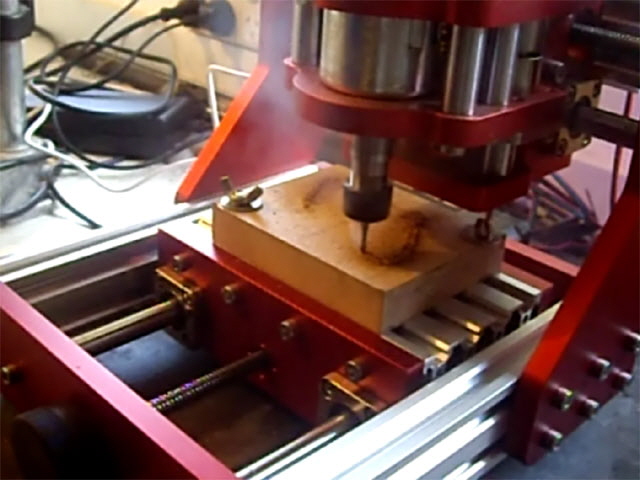
Figure 25. MDF Burning - Wrong Speeds and Feeds
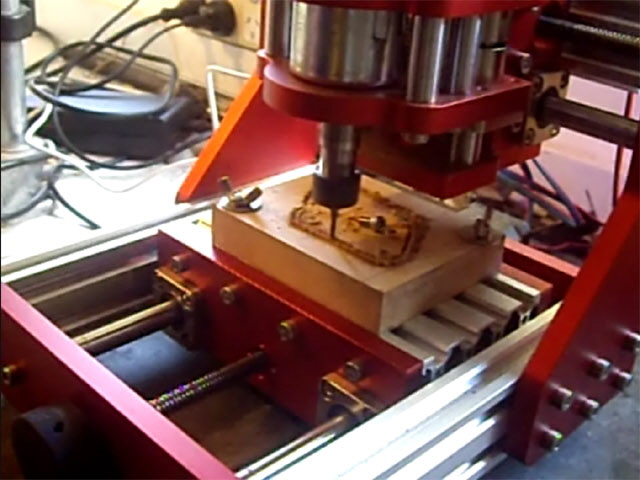
Figure 26. Where did that Machine Screw Drop From?
At the end of this first experiment I have some adjustments to make. The spindle speed needs to go up and the feeds and cutting depth need to go down. I have also made some mistakes with MeshCAM in converting the model to G Code resulting in an incomplete path specification. While the job is pretty rough due to tool damage and fluffing the mill has cut the basic profile and the dimensions of the milled surfaces are over-sized by about 0.12 mm. Not bad for a first attempt.
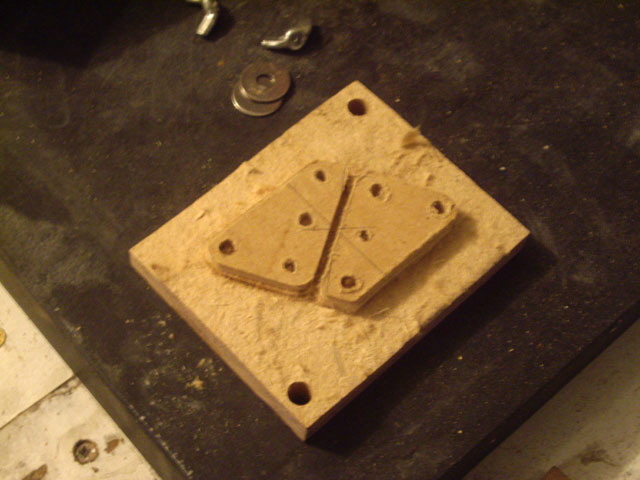
Figure 27. First 3D Milling Job in MDF
(Bulk stock hand-cut from profile.)
MDF is actually quite difficult to machine, but it shouldn’t be this difficult. The surface layer is quite hard (heat and pressure set lignin in formardehyde resin, often with additives) where as the core is somewhat soft and laminar. The recommended cutting speed is quite high at 200 m/min and we cannot achieve this with the standard spindle motor and a small diameter (2 mm) tool. Rather than persist with MDF for now I have decided to try again using Perspex (acrylic). This has a much lower surface cutting speed of about 38 m/min without cutting fluid, and has homogeneous composition. However Perspex is quite brittle and excessive chip load is likely to cause chipping. If you’ve ever cut Perspex sheet with a power saw with a course blade chances are you’ll get chipping on the underside at the edges of the cut.
I’ve mounted the 6 mm thick Perspex using double-sided adhesive tape to the sacrificial bed. This is surprisingly secure and allows me to complete the profile cutout without having to change the clamping arrangement mid-way through the job. The tape is about 1.2 mm thick which provides plenty of clearance for cutting the profile without going into the sacrificial bed.
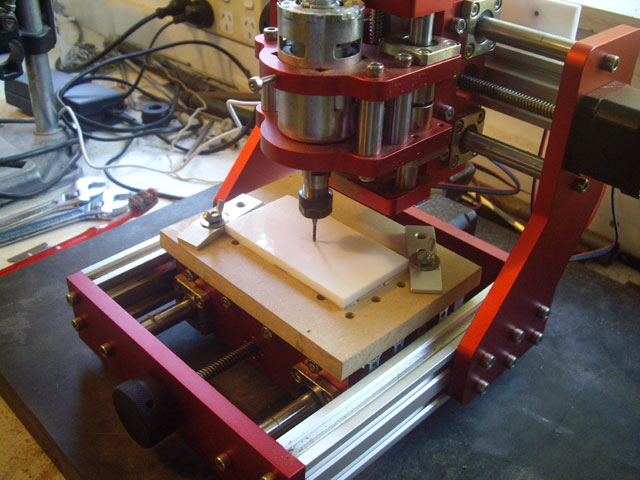
Figure 28. Perspex Tape Mounted with Tool Zeroed
I started the job with the same milling cutter that I’d used on the MDF but it broke withing a few seconds. The cutter flutes were clearly burnt and as a consequence the tool wasn’t cutting. I replace the tool with a new one (this is why you should buy a few tools) and offset the start point by about 0.5 mm in the X and Y so I could complete the model using the same piece of Perspex.
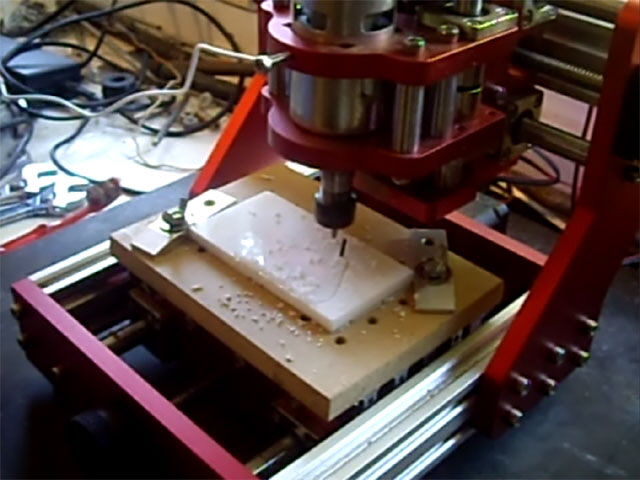
Figure 29. Broken Milling Cutter in Perspex
(Caused by burnt flutes on MDF.)
You can see a You Tube video of a layer roughing cut by clicking on the following link.
CNC1208 Milling Perspex YouTube Link
The job machined quite well with just a hint of too much X and Y feed at times for the roughing cut. But I managed to get the tool path wrong again and the waterline finishing pass was way too fast because I forgot to adjust this parameter in MeshCAM. This error ruined the edge surface finish resulting in slight waves and stuffed up the milled hole dimensions.
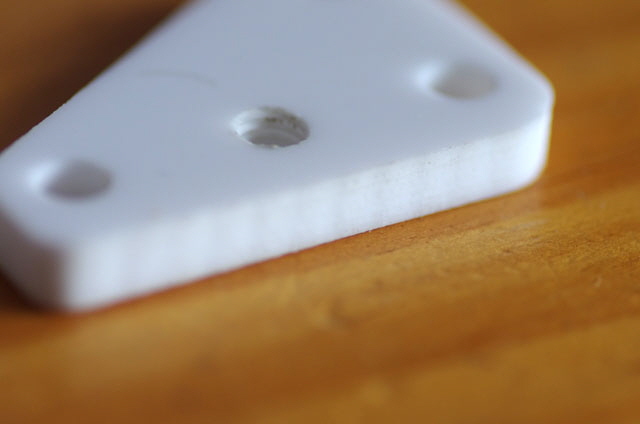
Figure 30. Wave Cutting caused by Excessive Finishing Feed
(Note no edge chipping.)
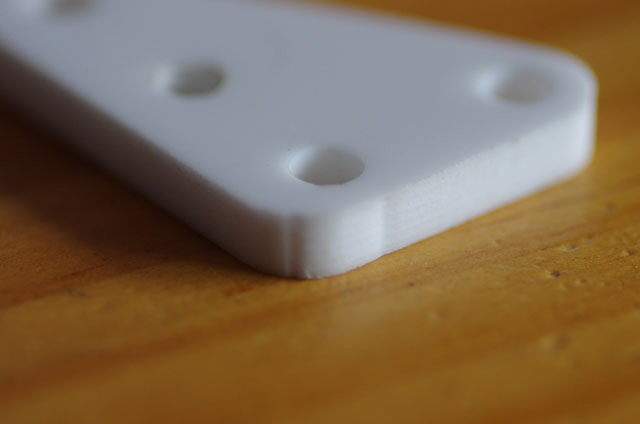
Figure 31. Finishing Pass Corner Indents caused by Excessive Finishing Feed
Despite the need for tuning the tool path and cutting parameters, the finished job is surprisingly accurate, and with hole over-drilling, completely serviceable. The profile and over-drilled holes are within +0.05 mm and should be even better with an appropriate finishing feed rate. There was absolutely no chipping of the Perspex. Making these parts by hand to the same precision would be very time consuming and labour intensive. I’m surprised by the result. To complete the job I set about hand- tapping three M6 x 1 threads and in the process managed to chip one of the faces. Oops, but this is just an experimental job.
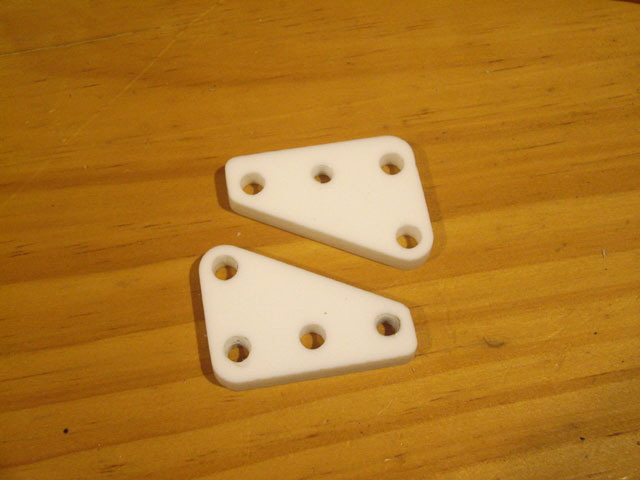
Figure 32. Finished Job
(Holes over-drilled and tapped, but no surface finishing)
Reflection on Milling Parameters
The ‘Machinery’s Handbook’ provides some guidance on feeds and speeds for milling but this is rather complicated and quite machine, tool and material specific. ‘Milling, A Complete Course’ is a pretty light weight introduction to basic milling. The book contains the following advice regarding speeds and feeds.
‘As a starter I would make the following recommendation: at 12 mm diameter, machining mild steel, set the speed to 500 rpm. From here, the important point to remember is that the cutter peripheral speed should be the same for all diameters, so at 6 mm make the speed 1000 rpm and at 24 mm diameter 250 rpm. For aluminium double these speeds…
As a guidance to width and depth of cut using an end mill, consider the maximum width of cut to be 1/3 cutter diameter and at this width, depth of cut also up to 1/3 cutter diameter. The depth can be increased somewhat if the width of cut is reduced.’
There are two critical parameters for optimum milling: surface cutting speed and chip load. This mill has a brushed DC motor (understood to be type 775) so the spindle speed is a function of voltage and load. We can set the unloaded spindle speed with G Code to a maximum value of S1000 at 8,300 RPM but the loaded speed will be less than the specified S value depending on the load. This is determined by the feed rate (vertical and horizontal), depth of cut, and the material for a given tool.
We want to cut as fast as reasonably possible for optimum surface finish without overloading the spindle or the stepper motors.
Larger machines use synchronous motors with gear trains and/or electronic speed control to maintain spindle speeds, but with our DC motor we can’t accurately control the spindle speed so we cannot control the chip load.
Based on the following Figure (which is typical for a DC brushed motor, but may not be appropriate for the 775 spindle motor with this machine) with a 24 V supply, the maximum speed is about 8,300 RPM, with peak efficiency at 7,300 RPM and maximum delivered power at 4,100 RPM.

Figure 33. 775 Motor Characteristic Curves
The graph is missing curve labels and Y axis units. The blue line with a negative slope is the speed (RPM) characteristic curve. The purple line is the total power (W) delivered to the motor. The black symmetrical parabolic curve is the motor output power (W). And the skewed curve is the % efficiency.
This is a small hobby mill. Bench scale mills capable of production have spindles capable of delivering an order of magnitude more power, where power (in W) = RPM x 2 x π / 60 x Torque (in Nm).
We only have absolute control of X, Y and Z feeds, the depth of cut, and the maximum unloaded spindle speed with CNC parameters for a given tool and material. If we get these wrong then we can expect all manner of poor performance ranging from broken tools, excessive loading and high machine time to burnt tools and inefficient cutting, all with less than optimal surface finish.
Most materials have relatively high recommended surface cutting speed speeds above about 60 m/min with a chip load of about 0.05 mm for small diameter (say 1/8” or 3 mm) tools. The following table has some recommended values for surface cutting speeds and chip loads from various sources for some common materials. With the exception of brass and wood which are machined without lubricant, the cutting speed can be increased significantly with an appropriate cutting fluid.
|
Material
|
Surface Cutting Speed
|
Chip Load
|
|
|
m/min
|
mm
|
|
Aluminium
|
60 (No Coolant)
|
0.07
|
|
Acrylic
|
38 (No Coolant)
|
0.07
|
|
Wood
|
200
|
0.10
|
|
MDF
|
200
|
0.10
|
|
Copper
|
460
|
0.03
|
|
Brass
|
610
|
0.02
|
|
Table 1. Typical Material Parameters
With a maximum spindle speed of 8,300 RPM and a tool diameter of 3.175 mm (1/8”) the maximum unloaded surface cutting speed is:
8,300 RPM x π x 3.175 mm / 1000 mm/m ~ 83 m/min
At 83 m/min with a two flute cutter our feed rate for an 0.05 mm chip load is:
2 flutes/Rev x 0.05 mm x 8,300 RPM ~ 830 mm/min = 14 mm/s
We want to run our spindle somewhere between 4,100 RPM for maximum delivered power and 7,300 RPM for maximum efficiency. So for most materials we must run the spindle at the maximum unloaded speed with an XY feed rate of between 5 and 10 mm/s to account for the reduction in spindle speed due to loading
Our Z feed rate should be about half the XY rate because of the cutting action at the bottom of an end mill is less efficient than the sides. So the Z feed should be between 2 and 5 mm/s.
Our maximum depth of cut should be about half the diameter of the tool for hard materials increasing to the diameter of the tool for relatively soft materials. So the maximum depth of cut will be between 1.5 to 3.0 mm depending on the material relative hardness. We should reduce our depth of cut to ensure that the spindle speed is maintained between about 4,100 and 7,300 RPM, with a higher speed generally producing a better surface finish. This requirement results in depths of cut for typical materials of between 0.5 and 1.0 mm. For a new job it is recommended to start with a shallower depth of cut.
Another parameter that will be of interest is the overlap between tool passes, or step-over. This will typically be 45% of the tool diameter (say 1.4 mm) to minimize machining marks from the tool face.
Finally, for finishing cuts we’ll want a light cut at the highest spindle speed possible. This is best achieved by reducing the XY feed rate to the Z feed rate (between 2 and 5 mm/s), effectively halving the chip load.
Where possible an appropriate cutting fluid for the material is recommended with the exception of brass as this will improve the surface finish, reduce heating and preserve the tool life.
The following Table is a summary of best estimate parameters for a 3.175 mm (1/8”) two flute end mill on typical materials.
|
Parameter
|
Value
|
|
Spindle Speed
|
8,300 RPM
|
|
Roughing XY feed
|
5 to 10 mm/s
|
|
Finishing XY feed
|
2 to 5 mm/s
|
|
Z feed
|
2 to 5 mm/s
|
|
Depth of Cut
|
0.3 to 1.0 tool diameter
|
|
Step-over
|
30 to 45% tool diameter
|
|
Use trial cuts to determine optimum parameters.
|
|
Use an appropriate cutting fluid where possible.
|
|
Start with low feeds and cuts and increase to prevent mill overload (vibration, noise, heat, tool damage, poor surface finish).
|
|
Table 2. Summary of Recommended General Settings
Improved Mill Performance
The Benbox controller board and the stepper motor shields are rated for 36 Volts. With a DC brushed motor the speed is proportional to the drive voltage. So increasing the voltage from 24 to 36 V will increase the maximum unloaded spindle speed from 8,300 to 12,450 RPM. With our 3.175 mm diameter end mill the surface cutting speed increases to 124 m/min. Further, the available torque at a given speed also increases by a whopping 50%! Using a higher supply voltage allows an increase in feed rates and/or depths of cut, and more appropriate surface cutting speeds for typical materials. This has got to be the easiest way of increasing the capabilities of this mill.
Analysis of Poor MDF Job and Burnt Tool
My initial milling attempt with MDF resulted in lots of smoke, particularly on plunges and full 2 mm deep cuts, a lot of horrible noise (spindle overloaded) and the death of a milling cutter. The swarf had the consistency of dust with fluffing of the MDF. The smoke suggests that the tool is not cutting effectively and was rubbing against the MDF. Notably, the X, Y and Z stages did not skip during the milling operation even though the spindle motor was overloaded at times. Some of the overheating was possibly due to swarf not clearing the cut.
A typical 230 Volt AC 1000 Watt router will have a spindle speed of 24,000 RPM. A 10 mm diameter two tooth router bit will cut through MDF like a hot knife through butter. The horizontal feed rate is up to 50 mm/s for moderate (say 6 mm) cutting depths. The surface cutting speed for this configuration is somewhat less than 750 m/min, with a chip load of about 0.07 mm.
With my initial MDF experiment I had a spindle speed of S1000 (8,300 RPM unloaded), an XYZ feed rate of F300 (300 mm/min or 5 mm/s), and a 2 mm depth of cut with a 2 mm diameter end mill. The surface cutting speed was therefore somewhat lower than 50 m/min with a chip load of 0.02 mm. The combination of small chip load, low surface cutting speed, and too much depth of cut resulted in poor cutting and burning of the milling cutter flutes.
I figure that the XY feed rate was probably about right, but the Z feed was too high and the depth of cut was excessive for the spindle motor at 24 Volts. These factors reduced the surface cutting speed resulting in ineffective cutting.
Time for some Aluminium
The test model is a part for my honing guide and really want to be making this from aluminium. Let’s see what the CNC 1208+ can do with 1/4” aluminium plate.
I’ve programmed a 5 mm/s XY, and 2.5 mm/s Z feed. The depth of cut is just 0.7 mm with an 0.7 mm step-over. The spindle speed is 12,450 RPM with the 36 Volt power supply.
My first attempts at milling didn’t go well at all. For the first trial cut I forgot to start the spindle motor by amending the GCode. As you might expect the tool broke on the first plunge and it happened so quickly I didn’t have time to react. Oops, my dumb!
The second attempt with a brand new tool was a cock-up from the start because I forgot to re-zero the cutter in the grblControl program. As a consequence the stock was ruined by machining off centre, but in any case the new tool did not appear to be making a plunge cut at all.
I reset the origin and tried again with the same stock and tool. This time we were sort of cutting, but it was rough, even with lubricant, and on the second layer the tool broke. We just aren’t cutting effectively at all.
I reduced the spindle motor speed to 8,300 RPM by reverting to the 24 Volt supply and modified the model, halving the feed rates and depth of cut. The job was progressing, albeit with some vibration and noise, when suddenly one of the critical spindle motor mounting bolts fell off the machine. The spindle motor was now deflecting allowing the tool to move off the design tool path. About this time I noticed that the stock was starting to move on the double-sided tape? Before I could shut stuff down the power supply stopped all by itself?
I turned off the power and removed the job. The stock was comfortably warm. This was the cause of the job moving. It hadn’t actually come unstuck. The core of the double-sided tape had softened to a really stiff jelly.
The power supply issue wasn’t the plug (a potential problem when the electronics is mounted on the frame). It was reset by cycling the mains so I suspect it is due to overload limiting.
The tool hadn’t actually broken which was a miracle. Everything should be set in the ball park for effective cutting but the tool is clearly having a problem with plunge cuts. I put the tool in a drill press and tried drilling with it. It just wouldn’t feed at all. With significantly more pressure it began to cut and progressed about 0.5 mm into the stock before the tip broke clean off.
I examined my remaining six new tools. They clearly aren’t end mills. Wooh! They aren’t even two flute face mills. They are in fact a toothed side-cutting bark removal bit with six teeth per revolution. No wonder I am experiencing such difficulty with my milling experiments. The very first plunge is likely damaging the end teeth, making for lousy face milling. The additional teeth per revolution totally invalidates my chip loads – no wonder the swarf feels like dust and is not clearing from the slot. The fact that the CNC mill had actually completed this job with MDF and Perspex is a testament to its robustness. Sure, two bolts worked loose due to vibration from the excessive load, but the machine didn’t skip a step.
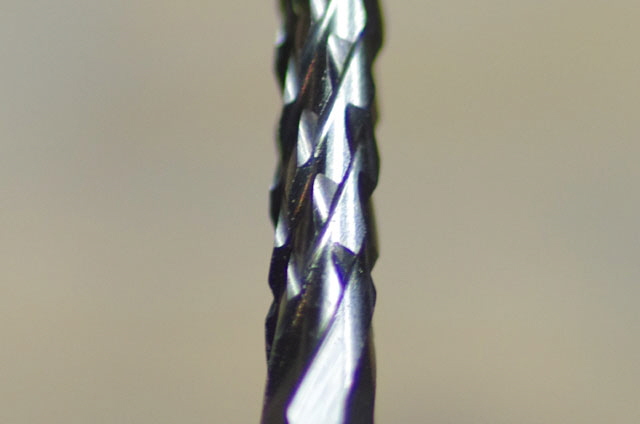
Figure 34. Two Flute End Mill - NOT
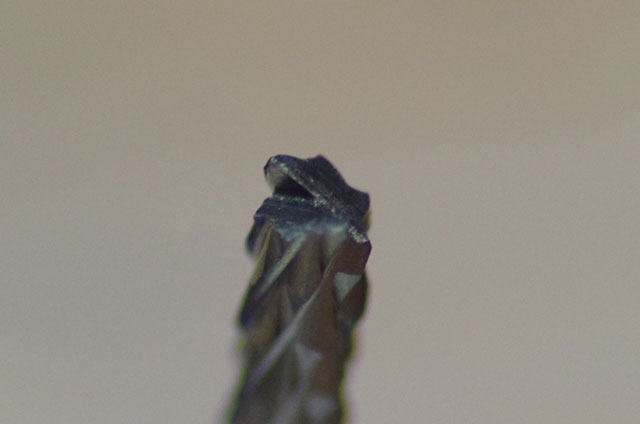
Figure 35. This Tool Face is not Ideal for a Vertically Cut
As it happens I have some 1/8” end mills on order, but this evening I will find some 1/8” slot drills and place these on order to. With some real end mills we might yet do some serious milling.
My new tools have arrived! These are in the form of carbide three flute slot drills and four flute end mills. They were somewhat more expensive than there predecessors but I expect that they will actually cut as opposed to grind.
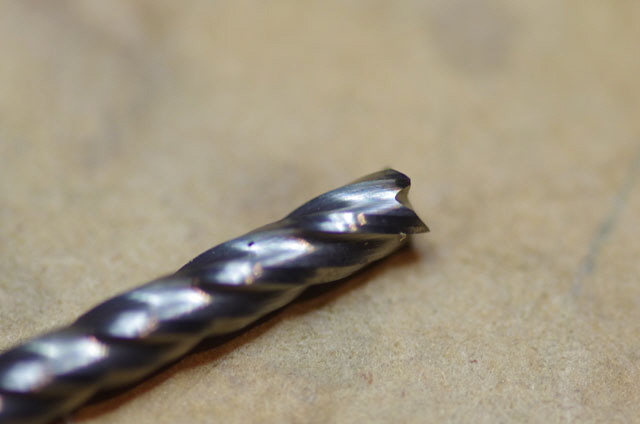
Figure 36. Real 1/8” Carbide 4 Flute End Mill
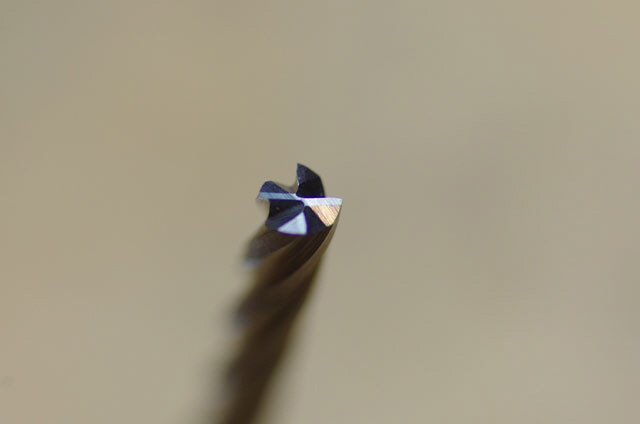
Figure 37. This Tool will Cut Vertically
(but easy on the vertical feed rate - it isn’t a drill)l
I tried some trial cuts on aluminium again today and was frustrated with failures. What on earth is going on? The first problem that I identified was that the spindle motor is turning backwards! That’s not good. Quite some time back I fitted some suppressor capacitors to the motor but the polarity is clearly indicated so I definitely put these back correctly. It is apparent that the spindle motor plug was incorrectly wired by the manufacturer (and I have the photo to prove it at Figure 7). The plug is polarized (it only fits one way) and the red wire was connected to the –ve termination on the controller board. With that problem fixed I tried again but the 24 volt supply is still tripping, even with very slow feeds into aluminium. Further, the tool is wandering over the surface. Tripping was resolved by reverting to my 36 Volt supply but the wandering issue persisted. I tried the tool on a drill press and it plunge cuts just fine. The spindle motor bearings seem to be okay so I figure that the wandering issue is due to backlash in the lead screw stage drives. This only becomes an issue at high loads.
There is no easy fix for these problems. I need a more robust machine with a more powerful spindle motor and ball screw lead screws for machining aluminium.
As a further experiment I fitted the 1/8” end mill in a drill press at 1,500 RPM and did some manual plunge milling on MDF, hardwood, Perspex and aluminium with a 2 mm depth cut. There was no burning. With the exception of the aluminium these materials milled with minimal effort despite the relatively low spindle speed. So I’m going to take a few steps backward and try milling MDF and Perspex again in order to determine if the current machine is capable of precision and repeatability for milling relatively soft material such as plastic and wood.
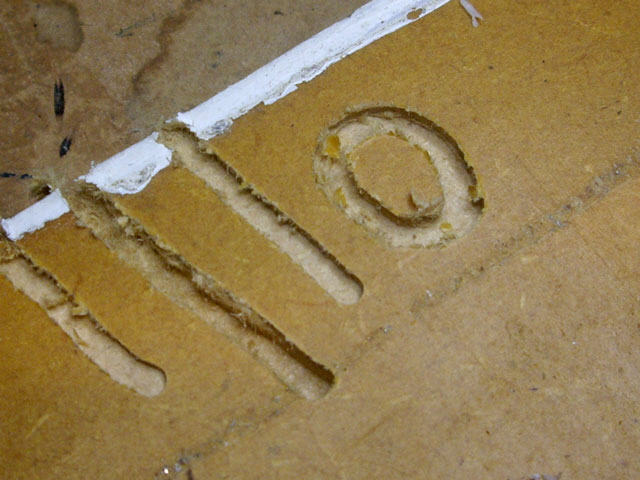
Figure 38. Hand Milling MDF with 1/8” End Mill in Drill Press at 1,500 RPM
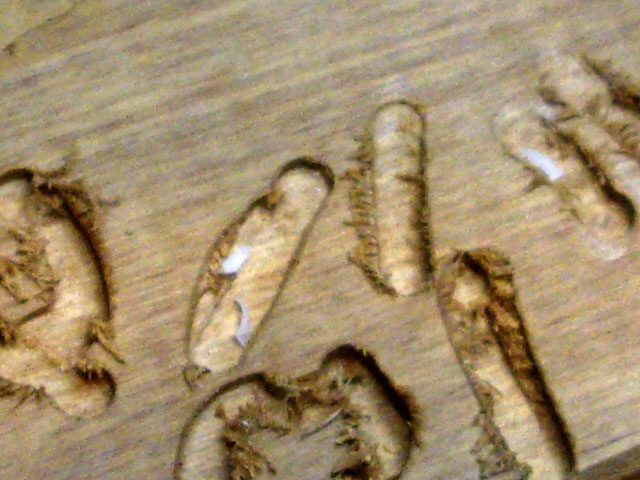
Figure 39. Hand Milling Hardwood with 1/8” End Mill in Drill Press at 1,500 RPM
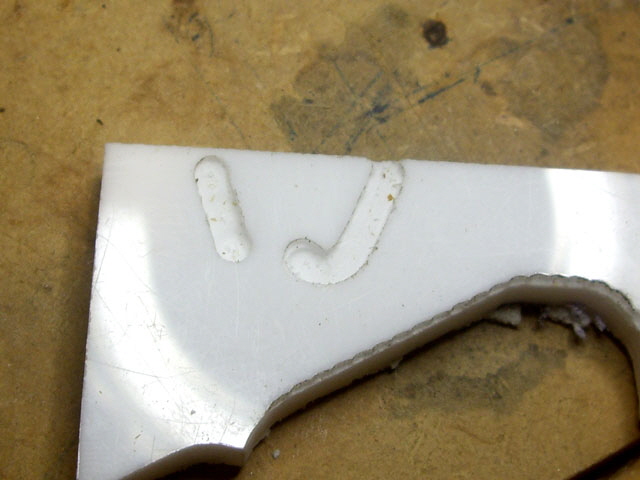
Figure 39. Hand Milling Perspex with 1/8” End Mill in Drill Press at 1,500 RPM
Pure aluminium is a relatively soft metal with a Brinell Hardness of around 15 BHS (cf. soft wood at 1.6 BHS, hardwood between 2.6 and 7 BHS, copper at 35 HB, and soft brass at 60 BH ). It should cut easily. But some aluminium alloys have a hardness as high as 75 to 100 HB which is right up there with mild steel (120 HB). The tensile and shear strength of these hard aluminium alloys is also about five times greater than the pure metal. My aluminium bar is certainly a hard alloy. Although I haven’t been able to determine exactly what it is I suspect that it is at the high end as might be used for aircraft or structures. It is not surprising that I’m struggling to machine the alloy.
I’m reverting back to machining soft wood for now.
The milling parameters in MeshCAM for the pine roughing cut were as follows:
1/8” diameter end mill
Unloaded spindle speed 12,450 RPM (36 V)
XY feed 450 mm/min
Z feed 150 mm/min
Depth of cut 1.5 mm
Step Over 1 mm
This is a pretty big job with a total depth of cut of 22.5 mm which is approaching the Z axis limit. The calculated milling time was just over 40 minutes although I can probably reduce this to less than 30 minutes by tweaking stuff in MeshCAM.
When setting up a job do make sure that the tool has sufficient length for the intended depth of cut so that the chuck face won’t crash into the job, and ensure that and mounting bolts or clamps are clear of the tool path. I only made one of these mistakes (tool not long enough) and the chuck drove into the top of the stock and stalled. This also killed the spindle motor driver MOSFET (type P55NF06L). This device is rated at 95 W but with a stalled spindle motor from a current limited 36 Volt supply it has probably exceeded its power dissipation. It has failed with a drain source short so the motor is always full on with no GCode control possible.
The best replacement I have in stock in a TO220 package is an IFR1405 device. This has a slightly higher gate turn on voltage (VGS 2 to 4 V cf. 1.4 V typical) and a similar maximum open circuit voltage (VDS 55 V cf. 60V) but a much lower RDS and a much higher power rating (330 W cf. 95 W). I also fitted a modest heat sink to the new MOSFET.
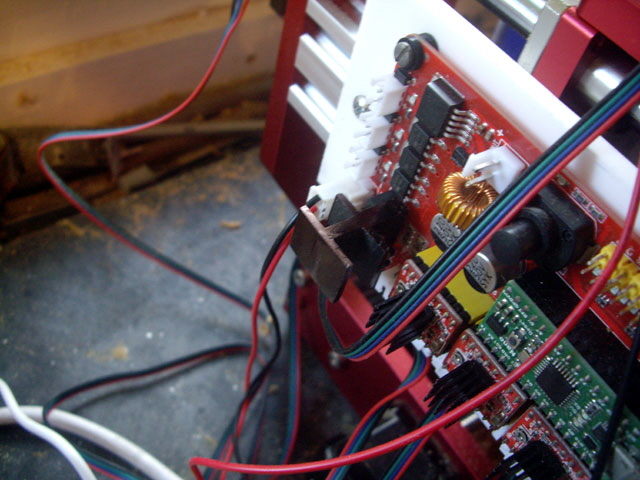
Figure 40. Replacement Spindle Motor MOSFET with Heat Sink
I set the mill running and the job finished beautifully. I repeated the job four times, and they all cut without issue. The mill is working quite hard at times but, based on noise and vibration, within acceptable limits. Another machine screw fell from the mill onto the workbench during this job. Thankfully no damage has been done.
You can see a You Tube video of the job by clicking on the following link.
CNC1208 Milling Pine YouTube Link
At the end of the milling I assembled the parts with PVA and gave them a light sand. These are trial segments for some curved stair rails. They are necessarily a short 30 degree arc to preserve the wood grain continuity in the finished curve. The finished parts were fractionally undersized by about 0.6 mm, and the stepping profile of the X axis finishing cut is clearly visible. I need to scale the model and remake the parts to compensate. The stepping could be significantly reduced by using a ball nosed tool as opposed to an end mill.
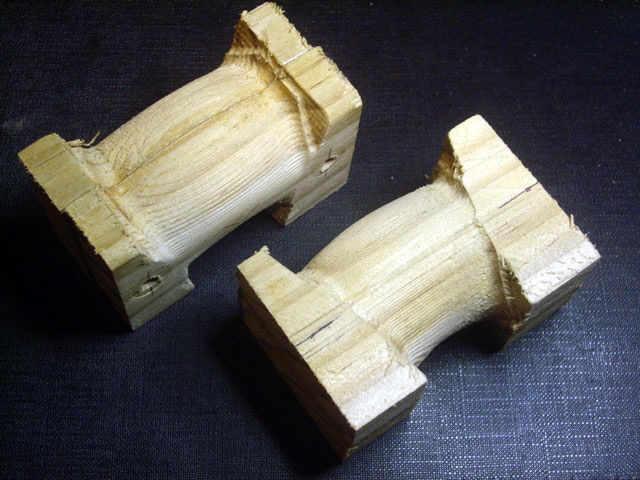
Figure 41. Stair Rail Bend Sections in Pine
With wood pretty much good to go it’s time to try Perspex again. I used the same model shown in Figure 32 above with the following milling parameters:
2 mm diameter end mill
Unloaded spindle speed 12,450 RPM (36 V)
XY feed 300 mm/min
Z feed 150 mm/min
Depth of cut 1.0 mm
Step Over 0.9 mm
The stock was cut to approximate size and stuck to the bed using double sided tape.
The job took just over 34 minutes and the results are much better than my earlier attempt. The mill is still working quite hard during the roughing cuts but, in my opinion, not overly so. The holes centres in the two parts align perfectly. There is no waviness or distortion in the outline, and the holes are round. All of the holes are fractionally over-sized by 0.20 mm and the profiles are undersized by 0.20 mm. The three flat bottomed recesses are also depth undercut by about 0.06 mm. I attribute this to the robustness of the machine and the axial backlash (which I may be able to improve). But the parts are fully functional.
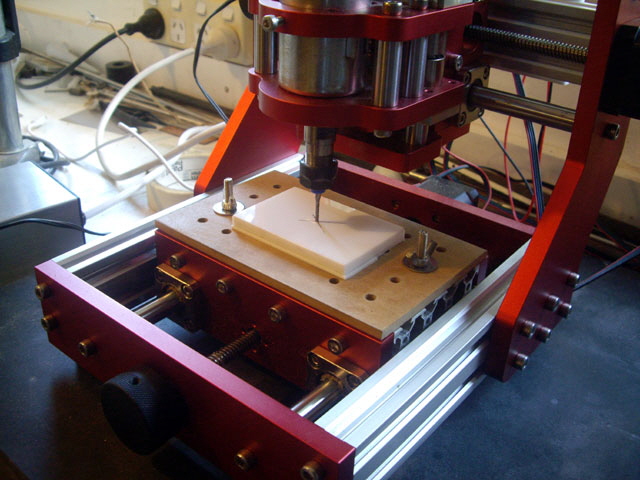
Figure 42. On Centre and Zeroed
You can see a You Tube video of the job by clicking on the following link.
CNC1208 Milling Perspex YouTube Link
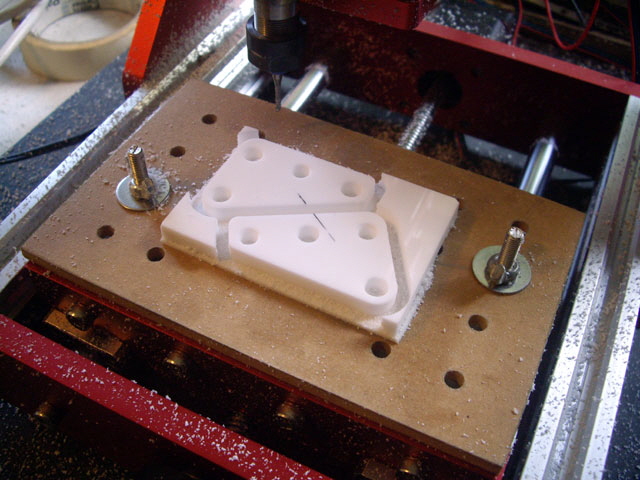
Figure 43. Finished Job after 34 Minutes
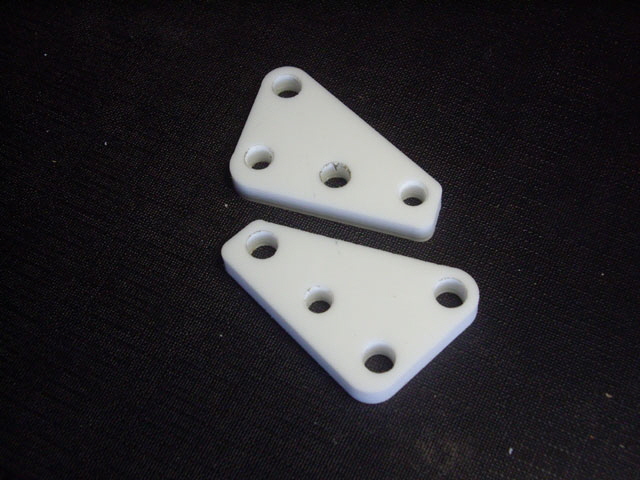
Figure 44. Functional Parts with just 0.2 mm Dimensional Variation
A third machine screw fell onto the bed during this job. It was from the z motor mount (as was the last one). The motor is still secure but I’ll be re-fitting the screw with somewhat more torque and double checking every other machine screw and bolt on the mill.
After changes to design of the parts shown in the Figure above, I’ve had to remake three sets. Rather than persist with the limitations of MeshCam, and the less than optimal tool path that it generates, I spent the best part of a day installing and learning how to to use Fusion 360 by AutoDesk. This product is available fee for educational users, hobby makers and small commercial enterprises. As you might expect with more flexibility , the learning curve is somewhat abrupt. But the end results are definitely worth the effort.
I remade the parts with my Fusion 360 model in less than 2/3rds the time of the MeshCAM code. The tool load was far better than MeshCAM, with no unnecessary Z axis moves or traverses. Each part finished in 10 minutes and 30 seconds of actual machine time. While the accuracy of the parts is largely down to the machine capability, I offset the machine back lash in the model to achieve an absolute tolerance of less than 0.10 mm with a maximum variation of the longest dimension of the part of +0.03/-0.00 mm across six parts.
You can see a You Tube video of the job by clicking on the following link.
CNC1208 Perspex - Fusion 360 Tool Path
The holes in the part were deliberately made small and over-drilled on a drill press. This addition operation took just a minute per side plate once the drill press had been set up.
Okay, we’re good to go with CNC milling wood and Perspex, but I’ve had no success with aluminium. Today I made some trial side entry cuts into some aluminium (unknown grade) plate at various feeds and depths of cut with an unloaded spindle speed of 12,450 RPM (36 Volts).
I started with a 1/8” three flue end mill with a feed rate of 150 mm/min and a depth of cut of just 0.5 mm, and progressively reduced the feed. The initial cut made a significant bur on top of the stock which suggests that it’s not cutting effectively. The lateral and axial surface finish wasn’t great. The sides of the test slots were not square implying that the tool is flexing. The tool seems to be hunting during the cut (cutting one moment and then free wheeling the next) which is quite audible. The swarf is more like grains of aluminium rather than 0.5 mm long chips.
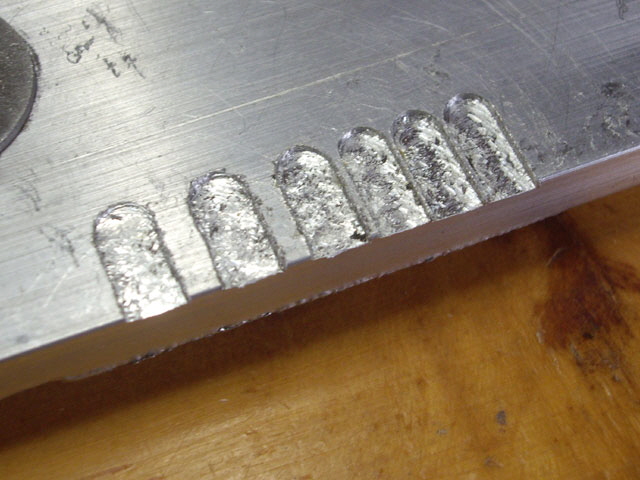
Figure 45. 1/8” Test Slots in Aluminium
The bur reduced with the use of cutting oil but it was still there. Progressively slower feeds right down to 25 mm/min made a slight improvement in the surface finish.
I measured the width and depth of the test slots. The widths ranged from 4.5 mm at 150 mm/min down to 3.8 mm at 25 mm/min. The depths showed little variation from the 0.5 and 0.7 mm programmed dimensions.
Okay, I need to reduce the load on the spindle motor. This means even shallower cuts and slower feeds or a smaller tool. I fitted a 2 mm diameter end mill and repeated the experiments with cutting oil. The bur almost disappeared and the surface finish has improved, but the sides of the slots still aren’t square and the tool is still hunting. The best performance came with a feed rate of 50 mm/min and an 0.7 mm depth of cut. A finishing cut of 0.2 mm improved the side surface finish but it is still not square. The test slots are still 0.6 mm too wide, but the depth is good.
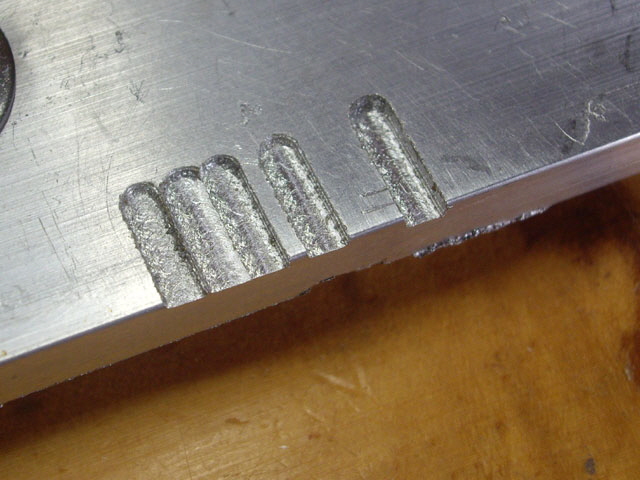
Figure 46. 2 mm Test Slots in Aluminium
(Pretty rough and 0.6 mm too wide.)
I went looking for the cause of the excessive slot width and non-square sides. The bearings on the spindle motor are free from play and the motor mount is secure even though the motor has clocked up about 24 hours of use, and some abuse. But the back lash on the stage drives is allowing the tool to move about 0.3 mm from rest in X, Y or Z. This is almost certainly the cause of the poor surface finish and over sized slot widths. There is no ready fix for this short of replacing the lead screws with ball screws or re-engineering the lead screw nuts.
As a final test I have set up a test slot model in AutoDesk Fusion 360. The purpose of this model is to reduce high tool loads at the final profile. I have specified side entry for roughing, with a ramped plunge, 0.3 mm lateral and 0.1 mm axial residual; followed by contour and horizontal finishing passes. The spindle speed is at 12,450 RPM and the feed and plunge cutting rates are both 50 mm/min. The maximum depth of cut is 0.7 mm. The tool is a 2 mm diameter three flute end mill. All cuts were made using hand-applied regular machine oil as a cutting fluid (this is not ideal - I should be using Kerosene and water).
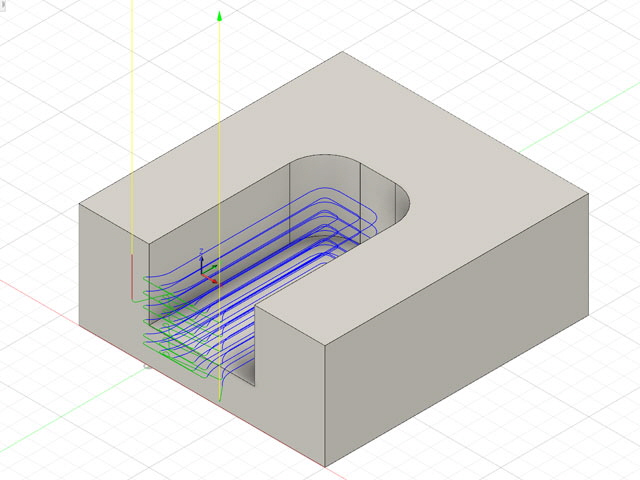
Figure 47. Test Slot Roughing Path in Fusion 360
(Slot dimensions: 4 mm deep, 6 mm wide, 10 mm long)
You can see a You Tube video of theTest Slot by clicking on the following link If you turn up the audio you can hear that the spindle is not under excessive load during the machining.
CNC1208 Aluminium Test Slot
The finished job isn’t too far off the mark. There are no burs at the top edge and the stock stayed cool to touch throughout. The surface finish is not perfect but it is relatively smooth with a finger nail test. The slot is slightly over-cut at 6.25 mm wide, and I suspect slightly longer than 10 mm although my tool zero was too crude to allow this to be measured. The slot was exactly 4 mm deep. The surface finish could be improved with second finishing passes.
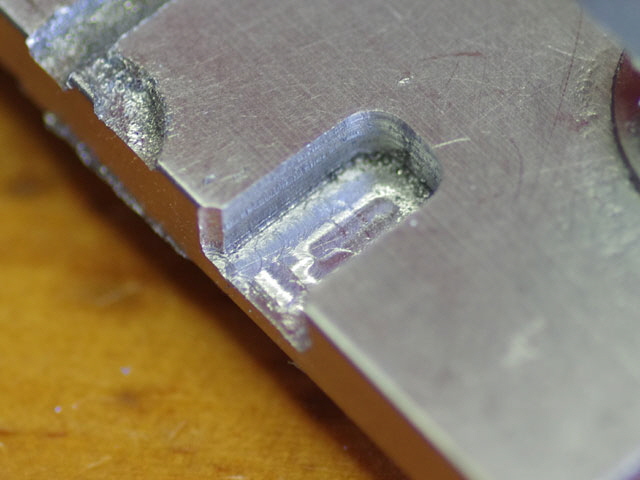
Figure 48. Test Slot in Aluminium
As a final test on aluminium I have re-modeled my side plate design in Fusion 360 to allow for the 0.3 mm undercut and with a side entry tool path. The feed rate is very slow at 50 mm/min, and the maximum depth of cut is just 0.7 mm to reduce the spindle load with a 2 mm diameter three flute end mill. The job takes just over an hour for the roughing and contour finishing passes, with hand addition of cutting fluid and removal of swarf with a tooth brush during the job. Rather than mill the holes which are critical to the design I’m centre drilling these on the mill and finishing them on a standard bench drill.
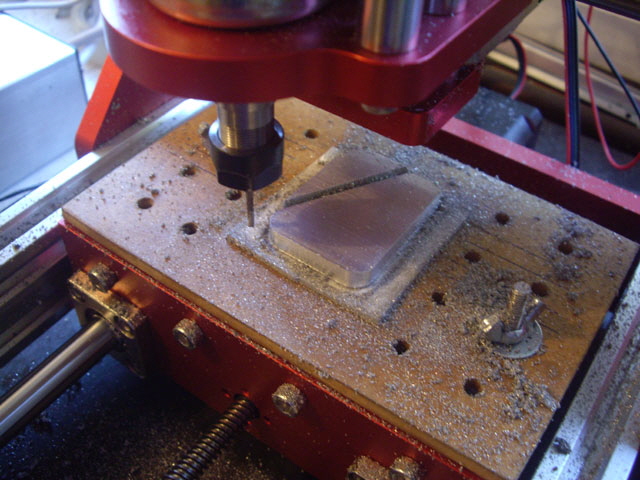
Figure 49. Finishing 0.3 mm Contour Cut
The finish shows some tool chatter which could be reduced with a second finish pass but the job is certainly usable and this toy mill is doing something useful with 1/4” thick aluminium rectangular bar. There was the slightest bur on the underside of the part, but the edges are so sharp that they will need to be filleted or broken. The finished dimensions are within with 0.01 mm by allowing for the 0.3 mm backlash in the machine. The radius corners are nice and smooth with no deviation from circular apparent.
I have three more of these parts to make.
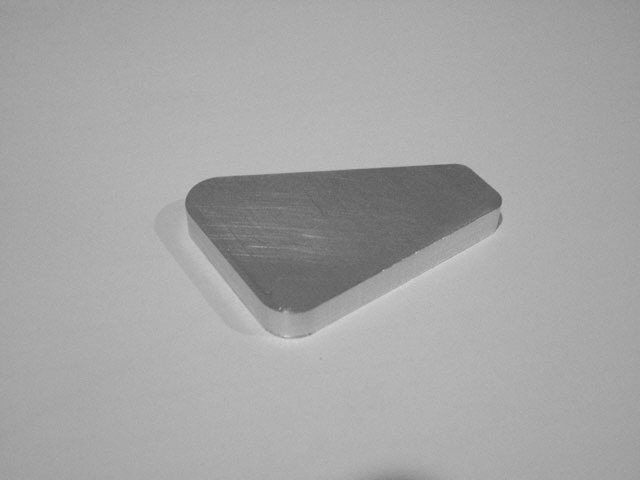
Figure 50. The Part Straight off the Mill
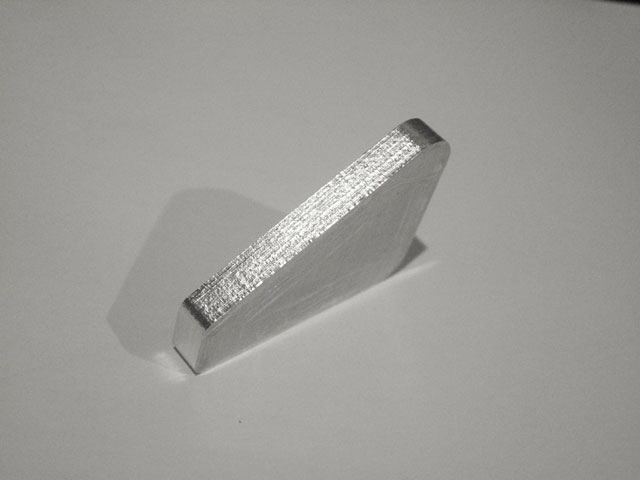
Figure 51. Slight Chatter Marks on the Milled Edges
(Almost flat under a finger nail.)
So this mill is actually capable of machining aluminium alloys, and by adjusting the model dimensions by about 0.3 mm to compensate for back lash I can get reasonable precision. However with a feed at just 50 mm/min and a maximum depth of cut of 0.7 mm machining is slow, and the 1208 CNC mill is not really robust enough for this duty.
So I’m looking for a more robust and capable machine with precision ball screws, a 2 kW spindle motor with a speed of around 12,00 RPM, a work area of about 300 mm X x 150 mm Y x 200 mm Z, repeatability at less than 0.02 mm, a fourth rotary axis, and all without going into overdraft. I’ve found a machine that will largely meet these requirements for a little over US$3,000 plus freight and import taxes; a Wellon Machinery Company XK7113D modified with MACH3, a 2.2 kW 12,000 RPM spindle, C3 precision ball screws, and a fourth rotary axis. The work envelope is slightly smaller than I would have liked at 220 mm x 120 mm x 200 mm but the table is 400 mm long and this should suffice for the majority of my applications within budget constraints. It is on order and should be here in about 8 weeks. I’ll be writing a new page on this machine when it arrives.
While I’m waiting for my new machine I have some more milling to do for stair rail bends. The 1208+ CNC mill is working at the very limits of Z feed for this job at 23 mm, and it is slow, but it is proving to be up to the task. My prototypes are shown at Figure 41 (above). So far I’ve made 24 sections at about 30 minutes per part, and I’ve got 16 to go. The tool path was modeled in Fusion 360 which is significantly more versatile than MeshCam, albeit somewhat more complex. The model was scaled to ensure that the back-lash did not result in under cut parts. Nothing gets unduly hot during the machining so I can work on other stuff while the job is running.
You can see a You Tube video of the job by clicking on the following link Listen to the audio track to hear the machine load.
CNC1208 Stair Rail Bend Segment
Towards the end of the job (after more than 24 hours of actual milling) the spindle motor began to exhibit intermittent starting. While I have completed my stair rail bends this is still a big deal because feeding a static tool into the job has a tendency to break stuff or ruin the job.
I suspect that one of the leads to the driving MOSFET (which I have already replaced) has a dry joint or there is a broken PCB track. When I touch the heat sink the motor starts. Fixing this is going to be a problem because I’ll have to cut the MOSFET leads to remove the component and find the damage, and I don’t have any spare appropriately rated MOSFETs in a T0-220 package
With the MOSFET removed the gate track is broken at the pad and two of the pads have lifted from the board while desoldering the MOSFET lead remnants. While I probably caused the lifted pad when I replaced the MOSFET, the track has only failed due to the weight of the unsupported heat sink and machine vibration over an extended period of time. The root cause of the failure is actually the design of the MOSFET PCB pads which are split in two by the through-hole slots.
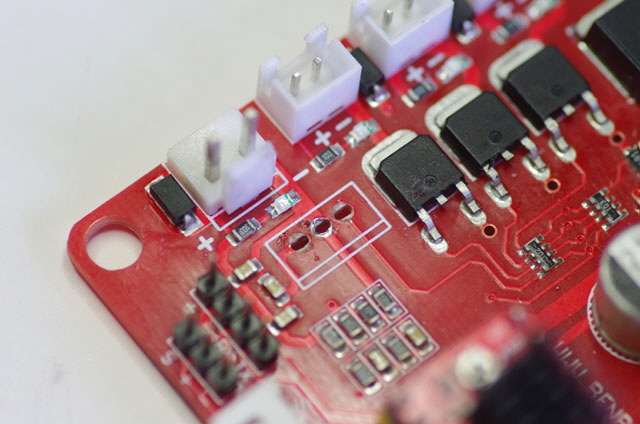
Figure 52. Oops! Broken Gate Track and Lifted Pads
I can repair the board but I’ll need some more MOSFETs and some 1.1 mm internal diameter copper rivets to remake the through hole connections. Both are on order. In the interim the machine is out of action for a week or two.
The rivets and MOSFETs arrived today, so time to make the repair. First up is to assemble the tools: a small ball peen hammer, a needle tool for handling and positioning the rivets, an anvil, a flat ended punch, a sharp 30 degree centre punch, and a scalpel.
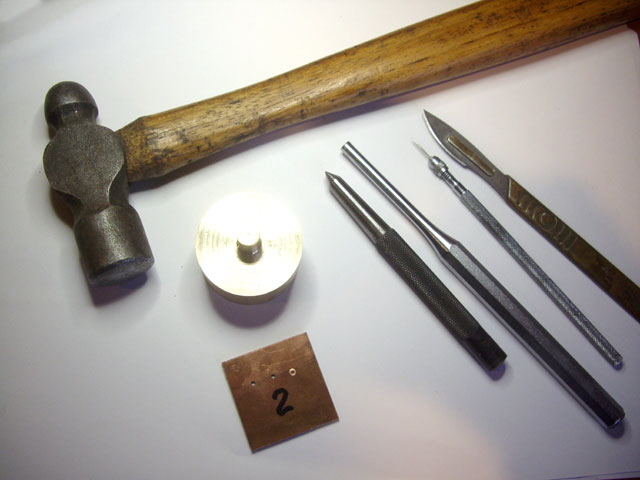
Figure 53. Riveting Tools
(Note the test piece.)
Before ruining the board I checked out the repair technique on a piece of scrap board. I drilled an 1.6 mm hole and fitted the rivet using the needle tool. This is so much easier than using tweezers, where a missed grip will send your rivet off to infinity. Next I positioned the rivet head on the anvil with the board held horizontal, placed the centre punch into the open non-flanged end of the rivet, and gave it a gentle couple of taps with the hammer. With the rivet head still on the anvil, applied the flat ended punch and give it another tap with the hammer. The rivet is absolutely secure and a multimeter test shows a dead short between the copper planes on the scrap. The only way I could remove the set test rivet was to drill it out.
With the technique sorted it was time to fix the controller board. I drilled out the middle of the slots to 1.6 mm diameter and tested the rivet placement. There is a slight problem. The rivet flanges are going to overlap! The diameter of a peened rivet head is about 2.6 mm. But the distance between adjacent lead centre lines on a T0-220 package is just 0.1” (2.54 mm). The holes can’t easily be relocated so either the rivet on the central pin needs to be inserted from the opposite side to the other two, or the central rivet needs to be cut down to a rectangular profile. Cutting down with a scalpel or razor blade is not to difficult and provides best continuity for the PCB tracks so I settled on this.
Before proceeding with the riveting I cleaned back the solder mask off the tracks to about 1 mm beyond the holes by gentle scraping with a scalpel blade. This ensures that the rivets will bed onto clean copper track. I started by riveting the two outside holes. There are a whole bunch of SMD components near the MOSFET through holes so I took care to avoid these with the anvil. I trimmed the remaining rivet head rectangular with the scalpel, placed it in the central hole and temporarily fixed its orientation with adhesive tape. A few hammer taps later and the job was done.
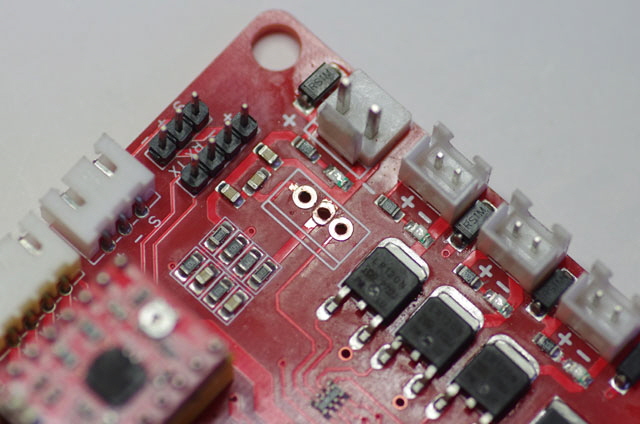
Figure 55. Component Side Pad Repair Using Copper Rivets
(Note the rectangular central rivet.)
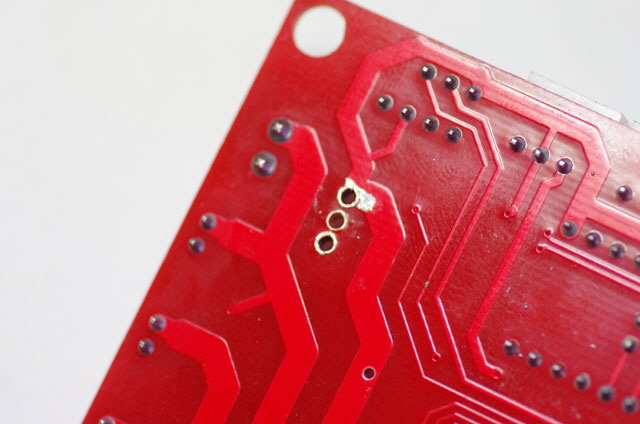
Figure 56. Solder Side Pad Repair Using Copper Rivets
Although continuity and insulation are just fine with peened rivets I chose to solder the rivets to the tracks. I fluxed the rivets, applied solder between the rivet heads and associated tracks, and cleaned up any excess with solder wick. If you want a professional repair now is the time to reinstate the solder mask with a thin layer of epoxy or similar.
The remade terminations are far stronger and more conductive than the original pads, and they should isolate the tracks from any force on the MOSFET. I’d like to fix the heat sink to the board but there is no convenient way to do this. My next best option is to reduce the mass of the heat sink while trying to keep a relatively high surface area. I’ve remade the heat sink out of some aluminium channel with 12 fins cut using a hack saw. The heat sink weight was reduced from 6.9 g to 2.4 g.
The basic T0-220 package (excluding leads) has a surface area of ~ 4.2 sq cm. With the original heat sink this was increased to ~ 16.7 sq cm. The new heat sink reduces this slightly to ~ 14.8 sq cm but it is still almost four times the area of the package so it should remain effective.
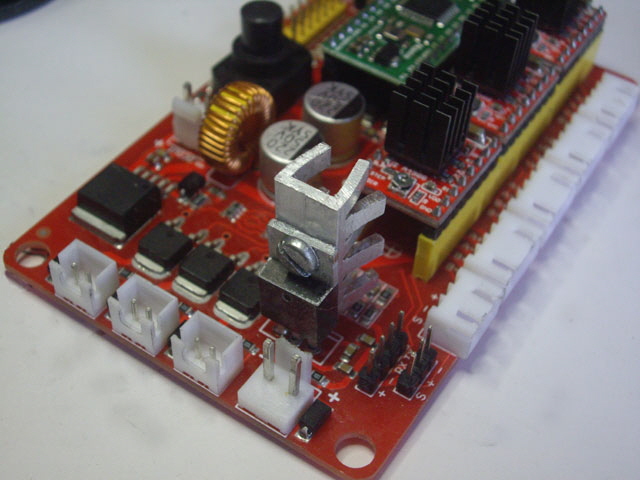
Figure 56. Repair Completed
With the MOSFET soldered in place the board has been tested and it is back in service. Whoot! This is probably the repair that I should have implemented right back when the OEM part failed. I still have a replacement controller board on order but this could take a few weeks, and in any case I’d still need to fit a heat sink to the spindle motor MOSFET before I could use it reliably with a 36 Volt supply.
An Unpleasant Surprise
While removing a finished job from the mill bed I got a moderate static shock off the machine chassis. Aside from being an unpleasant surprise this isn’t good. The immediate solution is to ground the machine chassis to mains earth.
Ground the mill chassis but do not use the spool motor negative terminal for this connection because it is not at mains earth potential!
The MOSFET drive is on the low side of the motor so the motor terminal voltages float somewhere between the negative and positive supply rails subject to the MOSFET PWM regulation (set through GCode) and feedback from the motor sense circuit.
With the machine chassis earthed the spindle motor won’t turn on. The power supply is good so I removed and bench-tested the MOSFET. It is serviceable but the PCB gate track has failed again. I put a patch lead directly between the MOSFET gate lead and the associated drive resistor termination. We are back in business milling.
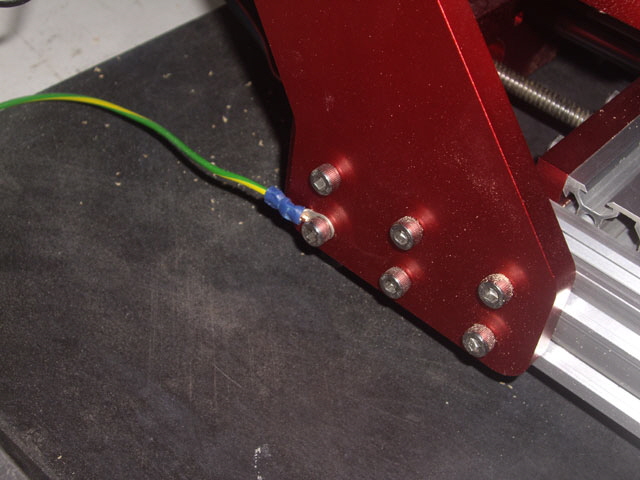
Figure 57. Mains Earthed Machine Chassis
My new controller board has turned up and surprise surprise, the spool motor drive design has changed. The drive MOSFET orientation has be altered so that effective naturally convective heat sinking is almost impossible to implement. But the motor drive circuit has also changed with two hefty 3.3 Ohm resistors in series with the motor armature, complete with a capacitor spark filter and a fast recovery suppression diode. I figure that the design has been altered because the original was prone to the very failures that I have been experiencing.
While adding resistors in series with the armature is common practice to limit motor starting and stall current (which for the 775 motor is more than 20 times greater than the no load operating current) the resistors are usually switched out once the motor has run up. If the resistors remain in circuit they reduce the motor terminal voltage resulting in reduced running speed and available torque. While the motor armature has inductance this is typically too low (say 1 mH) to limit the starting current. The whole point of the spool motor is to do real work.
There are other techniques to reduce the inrush current including series thermistors or inductors. Another trick is to place a large capacitor across the supply to provide the starting current without causing the supply to over-current limit or fold back.
Operating at say 24 V the motor current will be ~0.45 A at no load. For milling we want to be able to operate the motor at between 3.5 A for maximum efficiency and 5 A at the onset of power supply current limiting. But 6.6 Ohms in series with the motor will limit the current to just 3.1 A maximum and cause the motor terminal voltage to drop from 24 V to between 21 V with no load down to just 3 V when stalled, resulting in reduced speed and torque.
The resistors on the new board are rated at 1 W or more. Under no-motor-load from 24 V supply they will each be dissipating about 0.8 W, but during a motor stall they will be dissipating about 33 W each and can be expected to fail quite quickly.
The controlling MOSFET is Pulse Width Modulated (PWM) as with the original board. So the MOSFET should either be fully turned on or off. In the on state the MOSFET is rated with a drain to source resistance of just 0.018 Ohms. At the supply current limit of 5 A the MOSFET should not dissipate more than about 0.5 W, hence a heat sink shouldn’t be required. There will be additional power loss during PWM switching transients but these are brief and averaged over the PWM switching cycle and should be low.
The only way I can get reasonable spindle motor performance from the new board is to implement an external current limited driver, either using the existing or a second power supply. The PWM drive is available at a header but the voltage feedback isn’t. There are 48 V 400W PWM commercial drivers available but they cost more than the controller board! Under worst case conditions the driver will need to dissipate ~140 W. Thankfully the machine chassis comprises two large pieces of aluminium plate that will suffice for this duty.
Just now I have a Real CNC Mill to install, but there will be more to follow on the spindle motor drive...
|
